1
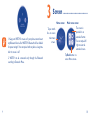
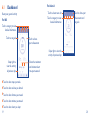
Music(1) can help play the previous/next and stop songs on
your phone. You can also adjust sound volume by making circles
on the screen with your finger.
Compass obtains geographic and altitude information. The
altitude information will be more accurate if you are outdoor
or in an open space. Conversely, the altitude may have deviation
if the weather or atmospheric pressure sharply changes, or you
are in a closed space such as an air-conditioned room or a cabin.
Camera(2)(3) controls the Camera in your phone to take a
picture. Touch the icon on your WATCH to turn on Camera
and touch
to take a picture. Images will be saved in the
Gallery of your phone.
Watch face personalises your watch face. You can swipe left/
right to select a watch face type.
Search phone helps you to find your phone. Touch it and
then your phone sounds or vibrates if WATCH is connected
to your phone.
Mute enables/disables vibration mode of your WATCH. When
Mute is on, notifications can still be received but you won't be
reminded by vibration.
Airplane mode disconnects WATCH from your phone. You
can touch this icon to turn airplane mode on/off.
Brightness personalises brightness of your WATCH. You can
touch this icon to adjust brightness.
(1) Make sure WATCH is connected with your phone.
(2) Make sure WATCH is connected with your phone.
(3) Make sure your phone is unlocked.
15
16