1
10
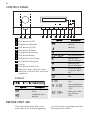
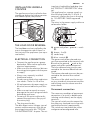
CONTROL PANEL
1
2
3
4
5
6
7
1 Programme dial
2 Push button On/Off
8
9
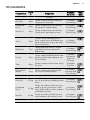
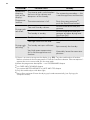
Symbol
delicate
5 Push button Delicate
6 Push button Anticrease
delay start
m/
m
anti-crease time
drying cycle
phase indicator
9 Push button Delay Start
10 Display
cooling cycle
phase indicator
11 Push button Start/Pause
12 Indication lamps: drain the water
container, clean the filter, clean the
condenser
crease guard cycle phase indicator
child lock activated
DISPLAY
cycle time indication
time programme
selection (10 min.
- 2h.)
Symbol
Description
maximum extra
dryness
3 Programme indicators
4 Push button Dry Plus
7 Push button Buzzer
8 Push button Time Drying
10 11 12
Description
default dryness
level
moderate extra
dryness
-
delay start selection (30 min. 20h.)
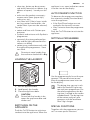
BEFORE FIRST USE
Clean the tumble dryer drum with a
moist cloth or set a short programme
(e.g. 30 minutes time programme) with
the load of moist cloths.