1
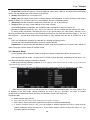
User Manual : allow you delete one selected preset. : allow you save relative parameters : allow you exit PTZ control interface Note: Up to 255 preset bits for the DVR can be stored. However, actual preset quantity differs depending on PTZ performance. 5.7 Record Enter into Pop-up menu to select the [Record] option. Now you can start manual record function, or you also can click [Rec.] button on the Front panel or Remote controller to activate manual record. Please stop record manually once you activate manual record. 5.8 Stop Record To stop record quickly, please enter into pop up Menu to select [Stop] option. 26