1
20
Maintenance and Care
Warnings
The system must be opened by trained service staff only. Never open
the RV Terminal, as this can result in the immediate loss of warranty.
Carl Zeiss will not be liable for any damage caused by opening the
system.
The RV Terminal must never be connected to the mains when it is
opened or defective.
Troubleshooting
There may be various reasons for malfunctions.
Please check whether
the RV Terminal has been connected to the mains supply;
the fuses of your mains supply are working properly;
the power fuses of the RV Terminal work properly.
Only for network connection: the network connections must be OK,
and the hub or server must be switched on.
Only for Smart Display: network connection to RV Terminal exists
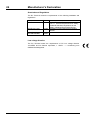
Meaning of the status LEDs for the network connection
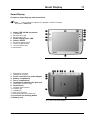
The LED is positioned in the upper left corner of the Smart Display and
shows the quality of the network connection:
Off
Green
Yellow blinking
No signal, no connection
Good signal quality
Poor signal quality
Changing the line fuse
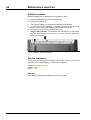
Above the power cable connection you will find a fuse compartment with two
fuses (T3, 15A L 250 V 5x20 IEC127-2/3). To change them, proceed as
follows:
A
B
C
Switch off the RV Terminal and remove the power cable.
Pull out the fuse holder with a screwdriver.
Replace the defective fuses in the fuse holder.
Caution: Only use spare fuses of the same type.
D Press the fuse holder fully into the unit.
E Connect the power cable and switch RV Terminal on again.
G 20-7004 e v1.0 RV Terminal