1
To connect the LCD monitor to your system, follow these instructions:
NOTE:
Make sure to read “Recommended Use” (page 4) before installation.
In order to display the maximum resolution, a display controller that can output a resolution of 1920 x 1200
(in landscape mode) or 1200 x 1920 (in portrait mode) is needed.
1. Turn off your computer.
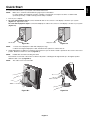
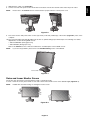
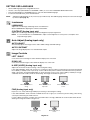
2. For a PC with DVI digital output: Connect the DVI-D cable to the connector of the display controller in your system
(Figure A.1). Tighten all screws.
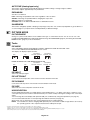
For a PC with DisplayPort output: Connect the DisplayPort cable to the connector of the display controller in your system
(Figure A.2).
DVI-D cable
DisplayPort cable
Figure A.1
NOTE:
Figure A.2
1. Please use a DisplayPort cable with a DisplayPort logo.
2. When removing the DisplayPort cable, hold down the top button to release the lock.
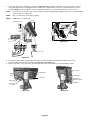
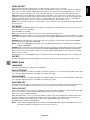
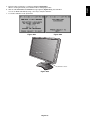
3. Height adjustment is locked by a lock button. Place hand on top of the monitor stand to push down the screen to the lowest
position. Slide the lock button to unlock (Figure B.1).
NOTE:
Handle with care when unlocking the stand.
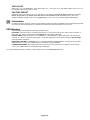
Place hands on each side of the monitor to tilt the LCD panel to a 30-degree tilt angle and lift up to the highest position.
Slide the cable cover up (Figure B.2).
NOTE:
The cable cover is not removable.
30° Tilt
Cable cover
Figure B.1
Figure B.2
English-7
English
Quick Start