1
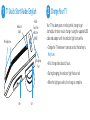
1 T1 Quick Start Guide: English
MultiFunction
Button
(MFB)
Indicator
Light
Microphones
Charging
Port
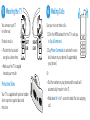
2 Charge Your T1
Your T1 has been given an initial partial charge to get
started, but for best results charge it using the supplied USB
cable and adaptor until the indicator light turns white.
> Charge the T1 whenever it announces that the battery is
Very Low.
> A full charge takes about 3 hours.
> During charging, the indicator light flashes red.
> When the light goes white, the charge is complete.
Vol +
Vol -