1
3 Starting Your Garden
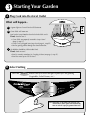
A Plug Cord into Electrical Outlet
What will happen...
Plug in
1 A green light on Control Panel will illuminate.
2 Grow Bulbs will come on.
Look under Lamp Hood to check that both bulbs are lit.
If not, check to see if:
• Grow Bulbs are properly inserted in Lamp Hood
(page 2, step 1C).
• Lamp Cord is plugged into Lamp Hood (page 2, step 1D).
• You are getting power through the electrical outlet.
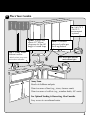
View Door
3 Air bubbles should be visible inside Bowl.
If not, check to see if:
• Bowl is securely seated on Air Coupling in Base (see page 3, step 1F).
• Bowl has water up to “Fill To Here.”
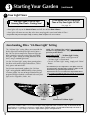
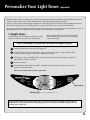
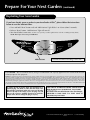
B Select Setting
Press the
SELECT
button until you reach the type of plant you are growing
(Vegetables, Salad Greens, etc.).
Herbs
Add Nutrients
Replace
Bulbs
Salad
Greens
Vegetables
Flowers
Water Low
Live Plants
24-Hour
Light
Note: Depending on the plant type selected, your
AeroGarden 6 Elite+ lights will automatically
turn on and off at pre-programmed intervals.
8