1
OPERATION
Once all the connections are completed and checked, ensure that the volume control
is at the minimum setting (rotated all the way left).
Ensure that all source components connected to the M5 Phono Pre Amplifier
are switched ON. Source components should always be the FIRST components to
be switched on and the LAST components to be switched off.
Ensure that all power amplifiers connected to the M5 Phono Pre Amplifier are
switched OFF. Any power amplifiers in use should be the LAST components to be
switched on, and the FIRST components to be switched off.
The above procedure minimizes the possibility of loud noises produced by
components at switch on being passed to the loudspeakers and possibly causing
damage.
Turn on the M5 Phono by using the rocker switch located on the rear panel, above
the mains inlet IEC socket.
The M5 Phono requires approximately 45 seconds to initialize before it is ready for
operation.
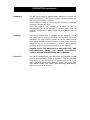
Input Selector
Turn the selector to the source you wish to listen to.
Volume Controls
There are two separate volume controls, one dedicated to
each channel. For a correctly produced Stereo or Mono
recording, adjust both channels to the same level. If it is
necessary to equalize the relative levels for each channel,
adjust the controls separately to achieve the desired balance.