1
Choosing a Location
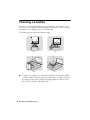
You can use your Epson MovieMate just about anywhere—in the living room,
bedroom, or even outside. You can use it with an optional floor-, wall-, or ceilingmounted screen, or simply project on a flat white wall.
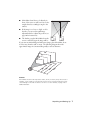
The following pictures show four different setups:
■
Front
Side
Back
Floor
To project onto a wall, choose a flat white wall with a smooth surface. When
you find a suitable wall for projection, you may want to consider coating the
area with projection paint to enhance the image quality. For details, see the
User’s Guide on the Epson MovieMate CD.
6 Unpacking and Setting Up