1
- Use is not possible in cluster configurations.
- The STP of connected switches must be turned off.
- DHCP cannot be used for iSCSI LAN IP addresses. Fixed IP addresses should be configured.
Refer to the hardware manual for details on other points.
- Public LAN
The public LAN is the network used by managed servers to provide services over internal or external networks (such as intranets or
the Internet).
On managed servers, use a NIC for other than that for the admin LAN.
Regarding advisory notes for network settings used by VM guests, refer to "Configuration Requirements for Each Server Virtualization
Product" of "E.2 Configuration Requirements".
A network interface can be shared between multiple public LANs by using a redundant configuration and tagged VLAN.
Information
For blade servers, depending on the model of LAN switch blade used in the same chassis, the network interfaces whose index numbers
are between 3 and 6 (NIC3 - NIC6) cannot be used.
Instead, it is possible to use two more interfaces for the public LAN by adding expansion cards (NIC7 and NIC8) and a LAN switch
blade, or by sharing the NIC used for the admin LAN.
All network interfaces shared between the admin LAN and the public LAN for managed servers should be configured with tagged
VLAN IDs.
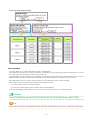
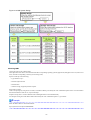
- Network configuration of LAN switch blades (when using PRIMERGY BX servers)
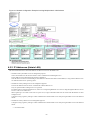
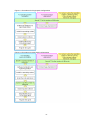
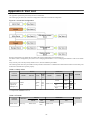
In a blade system environment, multiple subnets can be consolidated onto LAN switch blades by using VLANs.
For PRIMERGY BX900/BX400 LAN switch blades operating in IBP mode, the above can also be achieved by using port group
settings for IBP instead of VLAN settings.
Each port of a LAN switch blade can be set with VLAN IDs.
Only those ports set with a same VLAN ID can communicate with each other.
Setting up different VLAN IDs then results in multiple subnets (one per VLAN ID) co-existing within the same switch.
Define the VLANs to set on both the internal (server blade side) and external ports of each LAN switch blade.
- Internal Ports
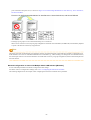
Ensure that port VLANs are configured for the ports corresponding to the NICs (refer to "Admin LAN") connected to the admin
LAN.
If NICs connected to the admin LAN are used for public LANs, configure tagged VLANs.
For the ports corresponding to the NICs (refer to "Public LAN") connected to the public LAN, assign a VLAN ID (port or tagged
VLAN) other than VLAN ID1 (the default VLAN ID) for each subnet.
Using tagged VLANs on LAN switch ports also requires configuring the network interfaces of managed servers with tagged
VLANs. As Resource Orchestrator cannot set tagged VLANs to network interfaces on managed servers, this must be done
manually.
- External Ports
Choose the LAN switch blade ports to connect to external LAN switches, and the VLAN IDs to use for both the admin and public
LANs.
When choosing a tagged VLAN configuration, the VLAN ID chosen for a LAN switch blade's external port must be the same as
that used on its adjacent port on an external LAN switch.
Note
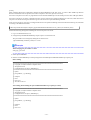
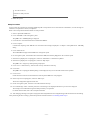
- To change the VLAN ID for the admin LAN, perform the following.
1. Enable communications between the admin server and the LAN switch blade.
Manually change the following two settings.
- Change the VLAN ID of the external port(s) used for the admin LAN.
- 47 -






![Hire And Sales Catalogue V4.40 [april2013].](http://vs1.manualzilla.com/store/data/005975062_1-8950e43f7cbe305f577dc550ee5fbd1b-150x150.png)