1
Source, Interactive Execution, and Standard Input/Output Windows
Chapter 4
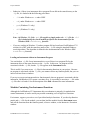
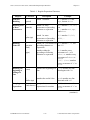
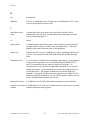
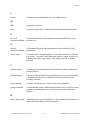
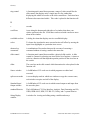
Table 4-1. Regular Expression Characters
Purpose
Character
Description
Example
Wildcard
Matching
.
(period)
match 1 character
a.t matches act and
apt, but not abort
Matching Zero
or More
Occurrences
*
(asterisk)
match 0 or more
occurrences of preceding
character or expression
0*1 matches 1, 01, 001,
etc.
a.* matches act, apt,
and abort
+
(plus sign)
match 1 or more
occurrences of preceding
character or expression
0+1 matches 01, 001,
0001, ...
?
(question
mark)
match 0 or 1 occurrences of 0?1 matches 1, 01, but
preceding character or
not 001
expression
|
(pipe)
matches either the
preceding or following
character or expression
a|b matches every
occurrence of a or b
abor|ut matches every
occurrence of abort or
about
{if}|{else} matches
every occurrence of if or
else
^
(caret)
matches the beginning of a
line
^int matches any line
that begins with int
$
(dollar sign)
matches the end of a line
end$ matches any line
that ends with end
Matching
Either/Or
Matching the
Beginning or
Ending of a
Line
Grouping
Expressions
{}
groups characters or
(curly braces) expressions for searches
{if}|{else} matches
every occurrence of if or
else
(continues)
LabWindows/CVI User Manual
4-14
© National Instruments Corporation