1
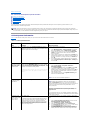
fails.
In Gateway solutions, the
Storage Manager for SANs
console displays incorrect LUN
size when LUN is greater than
2 TB.
management or Diskpart utility.
Any LUN that is greater than 2 TB is reported as 2 TB in the Storage
Manager for SANs console
In the Gateway solution,
The reported initial maximum size can be extended based on the
extension to maximum LUN size requirement of the RAID group it is a part of. The reported maximum size
grows.
for LUN extension increases after the extension operation on the storage
array because of the one or both of the following factors:
l
l
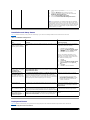
In Gateway solutions, actual
LUN extension Size is smaller
than the requested size.
This is a known issue.
Verify the maximum allowed LUN size through
Navisphere Manager
The API allocates a safe buffer zone during the estimation of the
maximum size of the RAID group, due to the required 5—7%
overhead of the RAID group.
A new RAID group with additional disks may have been created.
After a successful LUN creation, the reported LUN size is smaller than the
requested LUN size from the Share and Storage Management wizard.
Verify maximum allowed LUN size through
Navisphere Manager.
The API allocates a safe buffer zone during the estimation of the maximum
LUN size. The maximum LUN size also depends on the RAID type. The
overhead is approximately 5—7% of the LUN size. For example, in a LUN of
size 100 GB, 2 TB is allocated to overhead.
Upgrade Issues
Table 1-5 provides a list of issues you may encounter during an upgrade and the possible workaround or solution.
Table 1-5. Upgrade Issues Issue
Description
Workaround/Solution
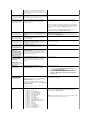
If Firewall is enabled during
upgrade, it may cause issues.
If the Windows firewall is enabled during upgrade from
Disable the firewall before starting the upgrade.
Windows Unified Data Storage Server 2003 Standard Edition
to Windows Unified Data Storage Server 2003 Enterprise
Edition, the Microsoft iSCSI Software Target console fails.
Importing Virtual Disks.
If you do not unassign the LUNs from a system correctly
before redeploying an operating system, the pre-existing
LUNs may be unavailable in the new operating system due
to SCSI reservation.
You must clear the SCSI reservation on the virtual disks
manually.
NOTE: For more information about the commands required
to clear SCSI reservation on virtual disks, see the
Dell PowerVault MD3000 Storage Manager CLI Guide.
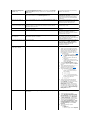
iSCSI Software Target console
crashes if a node has iSCSI
virtual disks assigned to it
before joining the cluster.
Back to Contents Page
If you create iSCSI virtual disks or targets before the node
joins the cluster, the iSCSI Software Target snap-in
crashes.
Perform the following steps:
1.
Stop the Microsoft iSCSI Target Service and then
close the PowerVault NX1950 Management
Console.
2. Launch cluadmin.exe® Groups® Cluster Group.
3. Right-click the Cluster Group and select New
Resource.
4. In the New Resource window, enter WinTarget as
the Service, and select resource type as Generic
Resource.
5. In the Dependencies window, add cluster IP address
and cluster name of your current single node cluster.
6. Add the registry key: SOFTWARE\Microsoft\iSCSI
Target.
7. Select the WinTarget resource and bring it online.
8. Disable the firewall and delete the cache file located
at%APPDATA%\Microsoft\MMC\nas2.
9. Start the Microsoft iSCSI Software Target Service.
10. Launch the PowerVault NX1950 Management
Console.