1
IK E LI TE V IDE O CASE
PREPARATION
S UP P L E M E N T A L I N ST R U C TI ON S F OR
P A C KA G E D W IT H
H OU S IN G _ _ _ _ _ _ _ _ _ _ _ _ _ _ _ _ _ _ _ _ _ _ _ _ _ _ _ _ _ _ _ _ _ _ _ _ _ _ _ _ _ _ _ _ _ _ _ _ _ _
# 60 7 1 C a n o n H V - 2 0 , H V - 3 0 , H V 4 0
• External UR/Pro Color Filter
• Internal Lens Shade
• Silicone Lubricant
C O L OR F IL T E R _ _ _ _ _ _ _ _ _ _ _ _ _ _ _ _ _ _ _ _ _ _ _ _ _ _ _ _ _ _ _ _ _ _ _ _ _
The installation and usage of the external UR/Pro
color filter is described in the general instruction manual.
L EN S SHA DE _ _ _ _ _ _ _ _ _ _ _ _ _ _ _ _ _ _ _ _ _ _ _ _ _ _ _ _ _ _ _ _ _ _ _ _ _ _ _
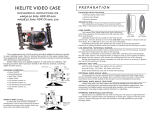
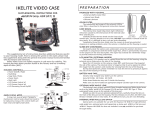
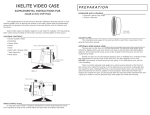
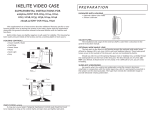
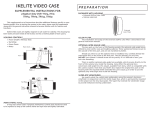
#6071 Canon H V-20
The internal lens shade helps block light reflection/
refraction caused by the interaction of the external color
filter and the port.
External
Color Filter
Internal
Lens Shade
Carefully thread the lens shade on the front of the
camera lens. The lens threads are very fine; D O N O T cross thread. It should screw on
very easily. If it is difficult to turn, you are cross threading.
Completely thread the lens shade into the camera to avoid any potential
clearance or sealing problems when the camera is installed and the housing is sealed.
This supplemental set of instructions describes additional features specific
to your housing model. Prior to testing the system in the water, please read this
supplement along with the general instruction manual to become familiar with
its features and functions.
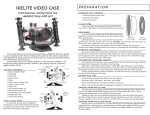
Ikelite Video Cases are slightly negative
in salt water for stability. This housing has
Power Zoom
Power
been water pressure tested at the factory Focus Lock/
Lid Snap
and has a working depth of 60m 200. Back Light
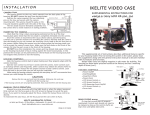
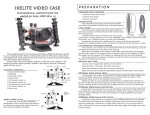
H O U S I NG C O N T R O LS _ _ _ _ _ _ _ _ _ _ _ _ _ _ _ _ _ _
Joy
Stick #1
• Power On/Off / Mode
• Start/Stop
• Power Zoom
Wheel Focus
• Photo
• Auto / Manual Focus Lock / Back Light
Base
• Focus Wheel
• Type / Card Switch
Auto/P-Mode
• Auto / P-Mode
• Joy Stick #1
Rec./
• Joy Stick #2 / Function
M AI N O - R IN G # 0 1 0 9 _ _ _ _ _ _ _ _ _ _ _ _ _ _ _ _
O-rings last several years if properly
maintained. Control seals should not need
to be replaced as long as the control shafts
are kept clean and lightly lubricated.
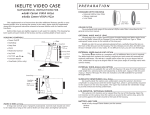
Port
S.S.
Eyeport
Type/Card Switch
Joy Stick #2/
Function
Mirror
Bottom Bar
Snap Shot
S UP E R- E Y E
V IE W F IN D E R_ _ _ _ _ _ _ _ _ _ _ _ _ _ _ _ _ _ _ _ _ _ _ _ _ _ _ _ _ _ _ _ _ _ _ _ _ _ _ _ _ _ _ _ _ _ _ _ _ _ _ _ _
See exactly what the camera sees underwater using the cameras electronic
viewfinder in conjunction with the Ikelite Super-Eye, which is permanently mounted
in the eyeport on the clear back plate. The Super-Eye extends the viewfinder image
to provide enhanced viewing underwater.
L C D M O N I TO R / E X T E R N A L
M I RR OR _ _ _ _ _ _ _ _ _ _ _ _ _ _ _ _ _ _ _ _ _ _ _ _ _ _ _ _ _ _ _ _ _ _ _ _ _ _ _ _ _
The cameras LCD monitor can be viewed from the rear of the housing, using the
external mirror featured on the side of the housing.
Open the LCD monitor on the camera, rotate 180°, and then press it back against
the side of the camera. The external mirror is hinged so that it can be opened to reflect
the image from the cameras LCD monitor for viewing from the rear of the housing. But
this will keep the eye piece turned off and the LCD image will appear opposite, left
to right.
During transportation, please remember to close the mirror by pressing it against
the side of the housing.
B A T TE R Y A N D
T A P E_________________ ___________________________ ______________
Install a fully charged Sony battery on the camera:
Canon NB-2LH, BP-2L13, BP-2L14
Other brand batteries may not fit inside the housing.
Make sure you have loaded an appropriate digital cassette tape in the camera.
O PT I O N A L W I D E A N GL E
L EN S_ _______ ______ _______ ______ _______ ______ __
The housingOs port accepts optional 67mm threaded waterproof Wide-Angle lenses
such as the Ikelite #6420 W-20, Epoque DCL-20 and Inon UWL-100 Type 2 and Sea&Sea
58070. These waterproof lenses secure to the outside of the lens port.
Should you elect to use the optional Ikelite #6420 W-20, Epoque, Inon or Sea&Sea
lens, carefully thread the waterproof lens on the front of the lens port. The lens threads
are very fine; DO NOT cross thread. It should screw on very easily. If it is difficult to
turn, you are cross threading.
I N T E R N A L W I D E - AN G L E L E N S O P TI O N _ _ _ _ _ _ _ _ _ _ _ _ _ _ _ _ _ _ _ _ _ _ _ _ _ _ _ _ _ _ _ _ _ _ _ _
Special ports are available for use with the Raynox HD-5050 Pro high definition
wide-angle lens. optional ports sold separately as dome port #9304 or flat lens port
#9304.1. Raynox HD-5050 Pro lens not included. Lens n o t available for purchase
through Ikelite.
F I N AL
P R E P AR AT I O N _ _ _ _ _ _ _ _ _ _ _ _ _ _ _ _ _ _ _ _ _ _ _ _ _ _ _ _ _ _ _ _ _ _ _ _ _ _ _ _ _ _ _ _ _ _ _ _ _ _ _ _ _ _ _ _ _
Remove the lens cap and cord from the camera. Otherwise, they may interfere
with the housing seal.
The cameras auto focus feature is utilized underwater. For best results, move
in close to your subject and use the wide angle range to shoot thru as little water as
possible. The full zoom range is accessible underwater.
ME R
A
Turn the cameraOs built-inCA
flash
OFF.
underwater.
Power On/Off
Zoom Lever
Focus
Exposure
Program AE
Shutter Speed
White Balance
Steady Shot
Built-in Flash
SEshows
T T IN G
Chart
recommended initial settings
N Camera On
N Wide Angle Setting
N Auto Mode
N Auto Mode
N Auto Mode
N 1/60 Normal
N Auto Mode see section
N Off
N Off
W H IT E
B A LA N C E _ _ _ _ _ _ _ _ _ _ _ _ _ _ _ _ _ _ _ _ _ _ _ _ _ _ _ _ _ _ _ _ _ _ _ _ _ _ _ _ _ _ _ _ _ _ _ _ _ _ _ _ _ _ _ _ _ _ _ _ _
Initially set the white balance to Auto. Use the Joy stick controls on the housing
to change white balance.
C o l o r F i l t e r : When using the color filter during the day, set camera white balance
to Indoor for 0-15 foot depth. For 15-80 foot depth, set white balance to Outdoor.
V i d e o - L i t e : When using optional Video Lite at NIGHT, set the camera white balance
to the Indoor position. During the DAY, use the Outdoor setting for subjects beyond
4-5 feet and the Indoor setting for closer subjects.
INSTALLATION
C AM E R A
T RA Y_ _ _ _ _ _ _ _ _ _ _ _ _ _ _ _ _ _ _ _ _ _ _ _ _ _ _ _ _ _ _ _ _ _ _ _ _ _ _ _ _ _ _ _ _ _ _ _ _ _ _ _ _ _ _ _ _ _ _ _ _ _ _ _
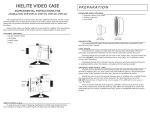
O’ring
The camera mounts to the tray, which extends from the back plate
of the housing. D O N O T remove the tray from theInternal
backLens
plate.
Back Plate
Shade
Position the camera against the two
stabilizing pins on the tray and secure with
the camera mounting bolt. The camera
should fit easily on the tray and should
be parallel with the sides of the tray.
Make certain that the lens shade has been
threaded completely into the camera to avoid
any potential clearance or sealing problems when Stabilizing
Camera Tray
Pins
the camera is installed and the housing is sealed.
Camera Mounting Bolt
I N S E R T I NG T H E C A M E R A _ _ _ _ _ _ _ _ _ _ _ _ _ _ _ _ _ _ _ _ _ _ _ _ _ _ _ _
Check that the oOring is clean and properly positioned on the lip of the clear
housing back plate. Check that the lens shade is completely threaded into the camera.
Once the camera is mounted to the tray as shown above, pull the housing
controls out to provide clearance for installing the camera. Make sure the lens shade
on the front of the camera fits into the port recess in the front of the housing.
D O N O T force this installation; the camera and tray should slide easily into place
so the housings back plate oOring is resting against the main housing body. In this
position the lid snaps can be positioned over the lid hooks on the housing back plate
and snapped into position to seal the housing.
H O U S I NG
C ON T RO L S_ _ _ _ _ _ _ _ _ _ _ _ _ _ _ _ _ _ _ _ _ _ _ _ _ _ _ _ _ _ _ _ _ _ _ _ _ _ _ _ _ _ _ _ _ _ _ _ _ _ _ _ _ _ _ _
Slide the housing controls back in place making sure they properly align with the
camera functions.
Operate each control to see how it works with the camera. Some controls such
as start/stop will be used frequently. Other controls may seldom be utilized. Refer to
your camera owners manual for the proper function of each camera control. Look
thru the back to be sure that you can see into the viewfinder.
When using the housing controls, especially the start/stop, do NOT use excessive force
because you could damage the camera.
CAU T IO N
Remove the lens cap and cord from the camera. Otherwise, the cord may
interfere with the housing seal.
If the housing controls are not properly positioned, they could interfere with the housing seal.
M AN U A L F O C U S
O P E R AT I O N _ _ _ _ _ _ _ _ _ _ _ _ _ _ _ _ _ _ _ _ _ _ _ _ _ _ _ _ _ _ _ _ _ _ _ _ _ _ _ _ _ _ _ _ _ _ _
Manual focus may be preferred in low light levels or when the subject possesses
little contrast. Set the focus switch to Manual to cancel the auto focus. If you want
to manually adjust the focus, rotate the manual focus control as desired. To reactivate the auto focus, set the focus switch to Auto.
I K E L I T E U N D E R W A T ER S Y S T E M S
50 West 33rd Street • PO Box 88100 • Indianapolis, IN 46208 USA • 317.923.4523
Email: [email protected] • www.ikelite.com