1
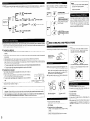
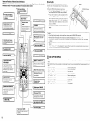
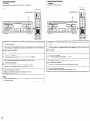
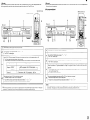
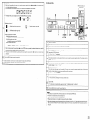
(2) Mix random
playback
(Remote control unit)
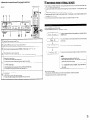
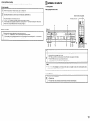
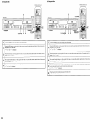
3. Dual mode
* In the dual mode, the CD ““It and CD-R ““It can be operated independently
* Manual recording from the man unit’s CD sexton can be performed.
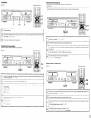
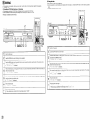
(1) Dual playback
(Remote control unit)
Select the deck to be operated.
(Man unit)
’I
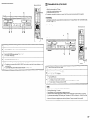
Load the discs you want to play I” the CD and CD-R units
2
Press the RELAY MODE button and select “-+
l
The “MIX” lndlcator lights
3
Press the CD or CD-R unit’s RANDOM button on the remote control unit to set the random mode
l
The “RAND” lndlcator Ilghts.
4
52i ,s ,:.,*’
MIX random playback starts when the CD a CD-R unit’s play button IS pressed.
The sound 1s output from the CD/CD-R output jacks
l
To qwt the nxx mode, press the relay mode button and select ‘5
isle
F: :
1
2
l
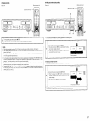
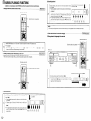
Load the dws
3
you want to play I” the CD and CD-R “nits
Press the RELAY MODE button and select “.
The “DUAL” lndlcatar Ilghts.
.z :. = ; :- ”
l
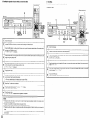
Dual playback starts when the CD or CD-R unit’s play button IS pressed.
The sound of the CD IS o”tp”t from the CD-only wtp”t jacks and the sound of the CD-R IS output from the CD/CD-R
output jacks
l
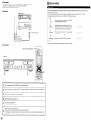
Only the sound of the CD-R IS output from the headphones jack.
l
The display can be swltched wth the DISPLAY SELECT button so that you can check the time !nformatlon. etc.. for
the CD and CD-R.
l
To quit the dual mode, press the relay mode button and select “- t%!c
” 2 ”
l
”
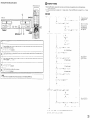
NOTES:
l
If the program and random mode IS not set in the nxx mode, the operation IS the same as I” the relay mode IwIth the
repeat mode off).
l
When relaying between a CD and CD-R, the dIgItal data from the CD/CD-R digital output termtnal IS interrupted
momentarily. The digltal (“put of the connected external dewce IS temporarily unlocked at thus tune.
26
-