1
Network Settings Help
The machine has been enabled by default DHCP in the factory, if you can not connect to
the network IP address it can be set manually to connect to the network.
WI-FI and LAN connections
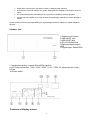
Plug the WI-FI module into the USB HOST interface, then connect your home computer's
network cable directly into the "LAN" port and set up the relevant network configuration to
use the machine's networking capabilities. Note: After inserting the WI-FI module, you must
restart the unit, and select the wireless mode; when using the home computer network
cable directly into the LAN port, remember to choose the cable mode.
Then return to the main menu interface and touch the screen or click the confirmation
button on the remote control to
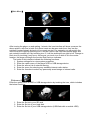
set options,Then enter the set list of items. A total
of seven topics: "Network Select" "the backlight brightness", "Select" "the backlight time,"
"Firmware Update" "touch screen calibration" and "System Properties." Select "Internet
options" to enter the network settings item list: "Wireless Settings" "IP Settings" "DHCP"
"Network Type." Select the "Network Type" if you are using a network cable, if connected
via WI-FI, select Wireless. If connect via WI-FI you will have to enter the "wireless settings"
and set the connection password(use remote
,
and
,
).Depending
on the type of network you use, you must enter "DHCP" and select Open, or to enter "IP
Setting" and enter the IP address and DNS server address setting. When you select Open
network, the DHCP can not connect via an IP address, you must manually connect to the
network by using the remote control number keypad to enter an IP address. For Network
set up, go into the main menu interface, select the network resource list, select the file you
want to play, then enter the file playback interface.
Play the files shared over network
To achieve a network share, first of all make sure all music files in PC disk files or folders is
set to shared state.
Play internet radio
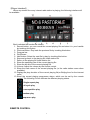
For playing Internet radio stations you must have set up the network first, then select the
main menu interface, enter the station list: "Area classification", "type category." By region
of Africa, the Americas, Asia, Europe, Middle East, Oceania, and the country or region, and
finally the station name list. Sub-stations are divided according to types, such as region or
musical category. Choices can be based on their own path, select the desired station and
entered the broadcast interface. You can use the numeric keypad on the remote control to
select stations, in the station list interface, press the remote control number keys to enter a
number, this number will list the corresponding radio station name on the left of each
number, then you can easily choose the desired station.
11