1
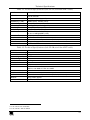
Contents
Contents
1
2
3
4
5
5.1
5.2
6
6.1
6.2
7
7.1
7.2
8
9
10
10.1
11
Introduction
Getting Started
Overview
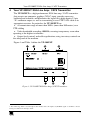
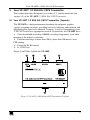
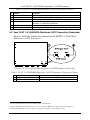
Your VP-200XLT XGA Line Amp / CAT5 Transmitter
Your VP-300T 1:2 XGA DA/ CAT5 Transmitter
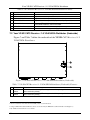
Your VP-300T 1:2 XGA DA/ CAT5 Transmitter (Topside)
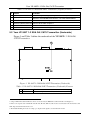
Your VP-300T 1:2 XGA DA/ CAT5 Transmitter (Underside)
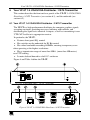
Your VP-5T 1:4 VGA/UXGA Distributor / CAT5 Transmitter
Your VP-5T 1:4 VGA/UXGA Distributor / CAT5 Transmitter
Your VP-5T 1:4 VGA/UXGA Distributor/CAT5 Transmitter (Underside)
Your VP-5R CAT5 Receiver / 1:5 VGA/UXGA Distributor
Your VP-5R CAT5 Receiver / 1:5 VGA/UXGA Distributor
Your VP-5R CAT5 Receiver / 1:5 VGA/UXGA Distributor (Underside)
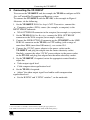
Connecting the VP-200XLT
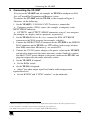
Connecting the VP-300T
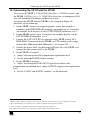
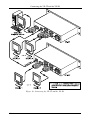
Connecting the VP-5T and the VP-5R
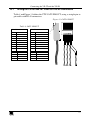
Wiring the CAT5 LINE IN / LINE OUT RJ-45 Connectors
Technical Specifications
1
1
1
3
5
5
6
7
7
8
9
9
10
11
13
15
17
18
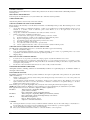
Figures
Figure 1: VP-200XLT XGA Line Amp / CAT5 Transmitter
Figure 2: VP-300T 1:2 XGA DA/ CAT5 Transmitter (Topside)
Figure 3: VP-300T 1:2 XGA DA/ CAT5 Transmitter (Underside)
Figure 4: VP-5T 1:4 VGA/UXGA Distributor / CAT5 Transmitter
Figure 5: VP-5T 1:4 VGA/UXGA Distributor / CAT5 Transmitter (Underside)
Figure 6: VP-5R CAT5 Receiver / 1:5 VGA/UXGA Distributor
Figure 7: VP-5R CAT5 Receiver / 1:5 VGA/UXGA Distributor (Underside)
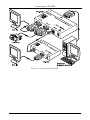
Figure 8: Connecting the VP-200XLT
Figure 9: Connecting the VP-300T
Figure 10: Connecting the VP-5T and the VP-5R
Figure 11: CAT5 PINOUT
3
5
6
7
8
9
10
12
14
16
17
i