1
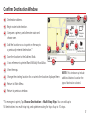
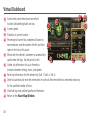
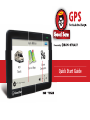
Confirm Destination Window
1
Destination address.
2
Begin route to destination.
3
Compare a primary and alternate route and
choose one.
4
Add the location as a via point on the way to
a previously entered destination.*
1
6
7
5
Save the location to the Address Book.
6
Cross reference to printed Rand McNally Road Atlas.
7
View the map.
8
Change the starting location for a route to the location displayed here.
9
Return to Main Menu.
10
Return to previous window.
2
3
4
5
10
9
8
NOTE: This window may include
additional buttons based on the
type of destination selected.
*To manage via points, Tap Choose Destination > Multi-Stop Trips. You can add up to
50 destinations in a multi-stop trip, and optimize routing for trips of up to 10 stops.
7