1
J
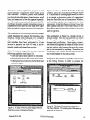
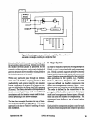
Figure 4a. A simple scrollbar diagram. Logic is
provided for rotating when the image is wider than high.
the area of the slide will cause the mouse coordinate to be emitted from the bottom pin of the
Mouse component. NumToPoint is a user-built
component that converts the Y value of the input
point to an integer which is both displayed in the
small number component below the graphic
viewer and passed through the gateway on the
right wall of the window to anything wired to it.
As the user moves the mouse with the button still
pressed, the cycle is repeated.
Bidirectionality permits the slider to be used as an
output indicator as well as an input control. If the
user types into the small number component or a
value flows in through the external gateway, it is
displayed in the number component, flows
through NumToPoint which changes the integer
value into a point, through Default (no change),
through ConstrainPoint, etc., and causesthe small
horizontal rectangle to be repositioned and redisplayed at the appropriate location in the graphic
viewer.
The use of a general algebra of images in Fabrik’s
synthetic graphics adds considerable leverage to
each application. For instance, the scrollbar example in figure 4 produces either a vertical or a
horizontal image, depending upon the aspectratio
of its framed image.
September25-30,1988
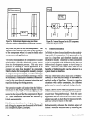
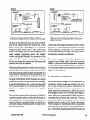
Figure 4b. Demonstrating the rotation logic. All
display and mouse-tracking operations are properly
scaled and rotated.
In this case,the background image, another Fabrik
diagram, is scaled and rotated as well asthe slider.
Mouse-tracking coordinates are automatically
transformed through this logic, leaving the scrollbar diagram relatively uncluttered.
From these examples of synthetic graphics it is
apparent how Fabrik deals with other dynamic
media. A musical score or an animation sequence
can equally well be synthesized as a set of primitive elements combined and transformed by other
higher-level functions.
6 The Draw component
As shown above, images can be generated by
connecting various grapheme creators and viewers. A step toward more direct manipulation of
graphical material is the Draw component. Currently a primitive component, it allows the user to
draw graphic objects as in a normal drawing program, while the corresponding Fabrik diagram is
automatically laid down and connected. The user
can further adjust the location and size of the
graphic objects right in the Draw component.
These changesare immediately shown asupdated
point values that are inputs to the grapheme creators. The Fabrik diagram generated is exactly the
OOPSLA‘88 Proceedings
183