1
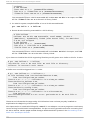
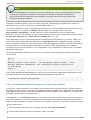
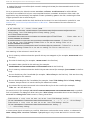
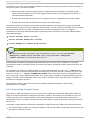
Chapt er 4 . Compiling and Building Multiple data collection runs, as seen in step two, will accumulate data into the profiling file instead of replacing it. This allows the executable in step two to be run multiple times with additional representative data in order to collect even more information. The executable must run with representative levels of both the machine being used and a respective data set large enough for the input required. This ensures optimal results are achieved. By default, GCC will generate the profile data into the directory where step one was performed. To generate this information elsewhere, compile with -fpro fi l e-d i r= D IR where D IR is the preferred output directory. Warning The format of the compiler feedback data file changes between compiler versions. It is imperative that the program compilation is repeated with each version of the compiler. 4 .1 .6 .6 . Using 32 -bit co m pile rs o n a 6 4 -bit ho st On a 64-bit host, GCC will build executables that can only run on 64-bit hosts. However, GCC can be used to build executables that will run both on 64-bit hosts and on 32-bit hosts. To build 32-bit binaries on a 64-bit host, first install 32-bit versions of any supporting libraries the executable may require. This must at least include supporting libraries for g l i bc and l i bg cc, and l i bstd c+ + if the program is a C++ program. On Intel 64 and AMD 64, this can be done with: yum i nstal l g l i bc-d evel . i 6 86 l i bg cc. i 6 86 l i bstd c+ + -d evel . i 6 86 There may be cases where it is useful to to install additional 32-bit libraries that a program may require. For example, if a program uses the d b4 -d evel libraries to build, the 32-bit version of these libraries can be installed with: yum i nstal l d b4 -d evel . i 6 86 Note The . i 6 86 suffix on the x86 platform (as opposed to x86 -6 4 ) specifies a 32-bit version of the given package. For PowerPC architectures, the suffix is ppc (as opposed to ppc6 4 ). After the 32-bit libraries have been installed, the -m32 option can be passed to the compiler and linker to produce 32-bit executables. Provided the supporting 32-bit libraries are installed on the 64bit system, this executable will be able to run on both 32-bit systems and 64-bit systems. Pro ced u re 4 .6 . C o mp ilin g a 32- b it Pro g ram o n a 6 4 - b it H o st 1. On a 64-bit system, compile hel l o . c into a 64-bit executable with: g cc hel l o . c -o hel l o 6 4 2. Ensure that the resulting executable is a 64-bit binary: $ file hello64 hello64: ELF 64-bit LSB executable, x86-64, version 1 (GNU/Linux), dynamically linked (uses shared libs), for GNU/Linux 2.6.18, not 71