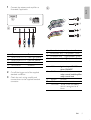
1
5 Play audio files
Play from USB/SD/SDHC/
MMC device
Note
Note
• Ensure that the disc or device contains playable files.
• Ensure that the USB or SD/SDHC/MMC device contains
playable music.
Play a disc
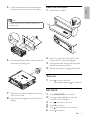
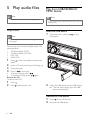
Insert the USB device
1
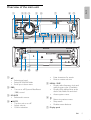
Open the cover marked
front panel.
2
Insert the USB device into the USB socket.
» The unit starts playing from the USB
device automatically.
Note
on the
• You cannot play CDs encoded with copyright protection
technologies.
You can play commercially available audio CDs
and these discs:
• CD-Recordables (CD-R)
• CD-Re-writables (CD-RW)
• MP3 CDs
• WMA CDs
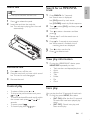
1
Press
panel.
2
3
4
Insert a CD with the printed side facing up.
1
2
Press
.
Press
beside the disc slot.
on the front panel to release the
Close the panel.
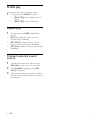
Press 1,
to start play.
• To pause CD play, press 1 .
• To resume CD play, press 1
again.
Remove the CD
To take out the CD,
Remove the USB device
1
2
14
EN
Press
to turn off the unit.
Remove the USB device.