1
6-2
GMS Tutorials – Volume II
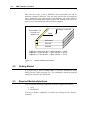
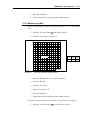
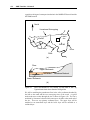
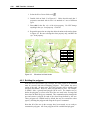
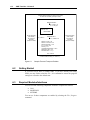
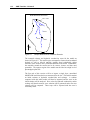
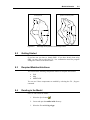
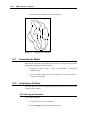
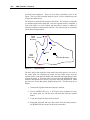
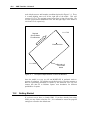
Constant head boundary (H=250 m) (flow model)
No mass flux boundary (transport model)
INJECTION WELL
Q = 0.001 m3/s
C = 57.87 ppm
Hyd. Cond. =
1.474x10⁻⁷m/s
LOW K ZONE
No flow boundary
(flow model)
No mass flux
boundary
(transport model)
DY = 2000 m
PUMPING WELL
Q = -0.0189 m3/s
Number of rows = 40
Number of columns = 32
Aquifer thickness = 10 m
K = 1.474x10⁻⁴ m/s
Porosity = 0.3
Longitudinal dispersivity = 20 m
Dispersivity ratio = 0.2
Simulation time = 1.0 yr
No flow boundary
(flow model)
No mass flux
boundary
(transport model)
DX = 1600 m
Constant head boundary (H = 36.25 m)
Figure 6-1
6.2
Sample Flow and Transport Problem.
Getting Started
If you have not yet done so, launch GMS. If you have already been using
GMS, you may wish to select the File | New command to ensure the program
settings are restored to the default state.
6.3
Required Modules/Interfaces
You will need the following components enabled to complete this tutorial:
•
•
•
Grid
MODFLOW
MT3DMS
You can see if these components are enabled by selecting the File | Register
command.