1
Getting started
Connecting external devices
Read the documentation on the external device before connecting it.
With the exception of USB devices, always remove all power plugs
before connecting external devices!
Do not connect or disconnect cables during a thunderstorm.
Always take hold of the actual plug when disconnecting a cable. Never pull the cable!
Ports on the device
Device
Externaldevices
Ports
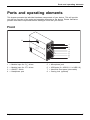
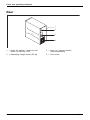
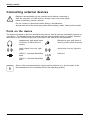
The ports are located on the front and back of the device. Not all ports are necessarily present on
your device. The standard ports are marked with the symbols shown below (or similar). Detailed
information on the location of the ports is provided in the manual for the mainboard.
Headphones, light green (back
of device) or black (front of
device)
Microphone port, pink (back of
device) or black (front of device)
Microphonejack
Headphones
Audio output (Line out), light
green
Audio input (Line in), light blue
Linein
Audioinput
Lineout
Audiooutput
USB 2.0 - Universal Serial Bus,
black
LAN
LAN port
LANport
USB 3.0 - Universal Serial Bus,
blue
UniversalSerialBus
Some of the connected devices require special software (e.g. drivers) (refer to the
documentation for the connected device and operating system).
16
Fujitsu