1
BB701
3
NOTE:
Only the boldface parameters are active for the default mod of operation. The other
parameters are not valid for operation with the BB701. They are only listed for the
sake of complete documentation of the controller.
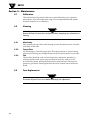
1. Press the
key to enter the programming mode. The lower display will
alternately display the menu level and “Ac.Cd.”
2. Use the
and
keys to change to the desired menu level.
key to scroll through the
3. Once you have chosen the desired menu use the
parameters. To change the setting of a given parameter, use the
and
keys.
key. The controller now exits the programming
4. To save settings press the
menu and return to the normal operating mode.
5. To change settings on other menu levels, you must re-enter the
programming menu (from step #1).
Figure 6. Changing the Controller’s Parameter Settings
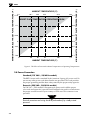
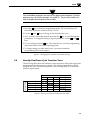
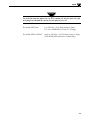
Heat-Up/Cool-Down Cycle Transition Times
The following table shows the amount of time required to change the target plate
temperature from one setpoint to another. The starting temperature is shown
along the left side. The final temperature is shown along the top. All transition
times are approximate.
-18ºC
0ºF
START TEMP.
3.5
-18ºC
0ºC
37.8ºC
93.3ºC
148.9ºC
Menu 00
Key Lock
0ºF
32ºF
100ºF
200ºF
300ºF
6.0 min.
13.5 min.
21.5 min.
22.0 min.
FINAL TEMPERATURE
0ºC
378ºC
93.3ºC
32ºF
100ºF
200ºF
1.5 min. 2.0 min. 3.0 min.
1.5 min. 3 min.
3.0 min.
2.5 min.
7.0 min. 3.0 min.
8.5 min. 4.5 min. 2.5 min.
148.9ºC
300ºF
7.0 min.
7 min.
6.5 min.
5.0 min.
01 Up/Cool Menu
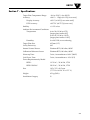
Menu Table
03
FigureMenu
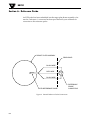
7. Heat
Down02Transition Time
SETPOINT
Ac.Cd
Ac.Cd = 02
Ac.Cd = 03
Gn.o
Gr.o2
rAtE
rSEt
H.Hys
HyS.1
C.HyS
HyS.2
C.SPr
SPr.2
ALr1
ALr2
Cy.t1
Cy.t2
SP.tt
L.SP.L
L.SCL
U.SP.L
H.SCL
128
1.1
03
12
00
00
OFF
0.0
300.0
Menu 04
Ac.Cd = 04
Menu 0
Ac.Cd = 0
id.no
bAUd
CAL.L
CAL.H
SnSr
Sn.00
dEC.P
FILt
OUt.1
OUt.2
CoL.t
A1.HL
A1.Pd
A1.OP
01
12.o.7
3-5
d
H
C
n
H
P
O