1
Connection
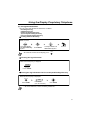
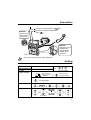
The telephone line cord (included)
UNIT )
Connect to a Hybrid IP-PBX ( TO/MAIN
PABX
Connect to a single line telephone for
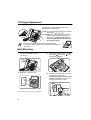
CAUTION
Ensure cords
are inserted
into grooves.
XDP ( TO TEL ).
CAUTION
Ensure the cord is
inserted in the
hook to prevent
damage to the
connector.
< Back view>
• Consult your dealer for more details about XDP.
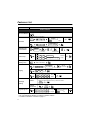
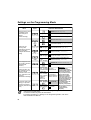
Setting
Speaker volume
While hands-free conversation
Handset/Headset
volume
While using a handset or headset
Ringer volume
KX-T7625 While on-hook or receiving a call
RINGER
Slide the lever of
the Ringer switch
to (Off/On).
Press Up or Down.
If On is selected,
press Up or Down.
KX-T7630/7633/7636
Press Up or Down.
LCD Contrast
KX-T7630/7633/7636
PAUSE
PAUSE
0
Ringing Tone
1
PROGRAM
PROGRAM
(CO)
OR
0
1
3
0
OR
OR
OR
PAUSE
Press Twice.
PAUSE
AUTO DIAL
STORE
13