1
GPS Mapping
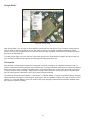
To begin Coverage Mapping, you first must open the MAP (.map) file created earlier. Insert the USB flash drive
into the USB port of the instrument. From there, at the Coverage Mapping menu, touch Save/Recall Points/
Map. In the Mapping Save/Recall submenu, touch Recall a Map. Find the file from the USB you inserted, and
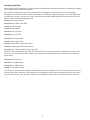
press Enter on the keypad. The map should now appear on the screen. If not done so already, the instrument will
attempt to lock the GPS by tracking at least three satellites. Your location will then be set for you by the instrument
relative to the map. Once that’s done, touch the Start Data Collection key to get started. The instrument will
automatically update your location and record points as you move. Once all the needed points have been plotted,
press Stop Data Collection to finish.
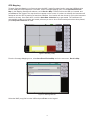
Figure 8: Recalling a Map
From the Coverage Mapping menu, select Save/Recall Points/Map and in the next menu, Recall a Map.
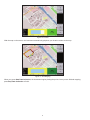
Figure 9: Selecting MAP file
Select the MAP (.map) file from the USB and press Enter on the keypad.
5