1
6-2
FX Series RFID Readers Integrator Guide
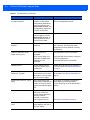
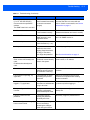
Table 6-1 Troubleshooting (Continued)
Problem/Error
Possible Causes
Certain real time applications are
no longer functional.
The node address, IP
address, or other reader
configuration parameter(s)
were changed using the
Administrator Console, and
the application expects the
previous configuration.
Update the settings within the application.
Refer to the application manual.
The user closed the browser
without logging out of the
Administrator Console, so
other applications cannot
connect to the reader.
Log out of the Administrator Console.
Cannot log into Administrator
Console.
The user forgot the
password.
Press and hold the reset button for more
than 5 seconds. This resets the reader
configuration to factory defaults, including
the password.
Unable to add SNTP server,
reader returning error.
SNTP server is not
reachable.
SNTP server name is not
resolvable via DNS server.
DNS server is not
reachable.
Ensure the SNTP server is accessible.
Operation failed.
A user operation did not
complete, typically due to
invalid input.
Validate all inputs and retry the operation. If
it is not successful, see Service Information
on page xi.
Invalid User Name and/or
Password - Try again.
The user name and/or
password were not found in
the system, or do not match
the current user registry.
Accurately retype login information. If this is
not successful, see Service Information on
page xi.
Session has Timed-out - Log in
again.
The current session was
inactive beyond the time-out
period (15 minutes), so the
system automatically logged
out.
Log in again. As a security precaution to
protect against unauthorized system
access, always log out of the system when
finished.
User name is not correct.
The user name does not
match the current user
registry (illegal characters,
too long, too short,
unknown, or duplicate.)
User forgot the user ID.
Accurately retype the user name.
The user name is duplicated
when adding a new user to
the user registry.
Enter a new user name.
The user name has already been
used.
Possible Solutions
Ensure the DNS server name is configured
in TCP/IP configuration.
Ensure the DNS server is accessible.
See Service Information on page xi.