1
Deliverable Number: D2-1
Multimedia and WWW Applications
(3) ViSiCAST UEAVisia3Wrapper ActiveX Control
1 Introduction
Deliverable D2-1 of ViSiCAST Work Package 2, is a prototype of an Internet Browser Plug-in, which
provides signing by an Avatar that is part of a web page. The Plug-in processes SiGML and provides
signing by an Avatar that is contained within a web page. The Plug-in consists of two ActiveX controls, the
Televirtual Avatar[4] and the UEAVisi3Wrapper. This document describes the UEAVisia3Wrapper.
2 Overview
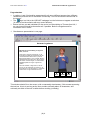
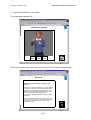
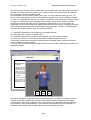
An ActiveX control, called UEAVisia3Wrapper, was developed implementing Play, Pause and Stop
buttons, and a progress bar. This was implemented to add a RealPlayer media-player type user interface to
the Televirtual Avatar ActiveX control as well as controlling the Avatar.
The ‘UEAVisia3Wrapper’ ActiveX control implements a play-list of motion files and these are fed to the
Avatar as appropriate. There are two methods available for a user of the ‘UEAVisia3Wrapper’ to specify
the motion files to be played. The first is to pass the wrapper control an XML document that contains
SiGML defining the motion files to be played. This is implemented by the ‘ReadSiGML’ method of the
wrapper control. The second method is called ‘AddToPlayList’. This accepts a motion file-name as its
single parameter. Each invocation of the ‘AddToPlayList’ method adds the file passed as a parameter to the
play-list.
This design encapsulated complication inside the UEAVisia3Wrapper ActiveX control and made the
construction of the Web Page simpler. It also allows the UEAVisia3Wrapper ActiveX control to be hosted
in other environments that support ActiveX controls.
3 Design and Implementation
3.1
Implementation Tool
The ‘UEAVisia3Wrapper’ ActiveX control was built using Microsoft Visual Basic 6.
3.2
SiGML
The ‘UEAVisia3Wrapper’ has the ability to accept ‘prototype SiGML’: when given an XML document
object that contains details of the motion files to be played. This is handled by the ‘ReadSiGML’ function.
The addition of this functionality means that Microsoft’s MSXML3 Parser needs to be installed for the
UEAVisia3Wrapper to work, [1]. (MSXML3 is also required by the Televirtual control.) To support this,
the SiGML DTD file (and the SMIL DTD file) must be in the same folder as any HTML file that contains
the ‘UEAVisia3Wrapper’, [2][3].
3.3
States
The UEAVisia3Wrapper implements maintains an internal finite-state machine which controls the progress
of the avatar and reflects the state of its graphical user interface. The seven states identified are:
0. Setting Up
1. Ready To Start
2. Playing
3. Playing Paused
4. Ready To Resume
5. Playing Halted
6. All Played
(3) 1