1
wxWidgets is a toolkit for creating GUIs that can run on multiple platforms. wxPython provides Python bindings
that allow you to create GUI elements directly from a Python script.
What It Does
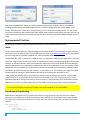
This example demonstrates how to combine the wxPython library and SNAP Connect. It constructs a GUI that
lets you configure your bridge node, encryption type, firmware image, and target node. The GUI also provides
real-time status updates to indicate how the upgrade is progressing.
This example also demonstrates how the firmware upgrade API can be used in an application.
How To Run This Example
python FirmwareUpgrader.py
This program does not take any command-line parameters. It creates a GUI with inputs to configure the bridge
and encryption.
After the GUI is started, logging information is displayed on the console and output to a log file in the same
directory as the application.
Additional comments are added to the source to better explain how SNAP Connect is tied into the wxPython
interface.
For a more detailed explanation, refer to the README.txt file.
Example Files
The following files can be found in the FirmwareUpgrader directory.
README.txt – describes the example in more detail
FirmwareUpgrader.py – the actual application source code – Creates a GUI for performing over-the-air
firmware upgrades.
You could reuse these techniques with other applications. The GUI elements could be altered to perform other
basic operations or provide application-specific functionality.
RobotArm – Example SNAP Connect Web Server
A common customer request is “How can I create an application that is controllable through my Web Browser?”
What It Does
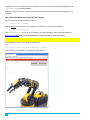
This example application combines SNAP Connect with the Tornado web server library, resulting in a program
(robotServer.py) that interacts with web browsers on one side (via Web Sockets), and interacts with SNAP
devices on the other (via SNAP Connect of course).
Commands made by the user in the web browser are sent from the web browser to robotServer.py, which
converts them into SNAP RPC calls over the wireless network. Remote data reported from the SNAP nodes is
received by robotServer.py, which updates the web page.
How To Run This Example
To run the full demo, you will need a robot arm to control. Look in file RobotArmHardware.pdf for details on
how to modify an off-the-shelf robot arm to be controlled by a SNAP Engine. (For ease of connections, our
SNAP Connect Python Package Manual
29