1
space). On the right-hand side of the arrow the products (A0 , B 0 , . . . ) and the
product stoichiometric coefficients (a0 , b0 , . . . ) are indicated. After the list of
products, the user has to specify the name for the rate constant (k in the example above) associated to the reaction, followed by a comma-separated list of
the partial orders of reaction (α, β, . . . ) for that reaction. The specification of
the reaction must end with a semicolon.
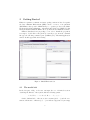
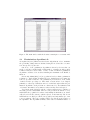
While the user is typing, KInfer is automating translating the list of chemical
reactions into the correspondent rate equations, showing the result in the upper
right part of Fig. 2, with possibly typing errors that prevent the tool to build the
correct mass action model. The list of the partial orders of reaction is optional:
if not specified, the default value can be chosen by the user between 1 (that is
the option “Default ONE”) and the stoichiometric coefficient associated with
the species (that is the option “Default STE”).
To load a model definition file into KInfer, select the “Load reactions...”
item from the “File” menu. This will show a classical open dialog box that can
be used to open the directory containing the textual reaction list file (usually
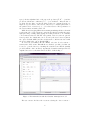
provided with the “.kin” extension). Opening the Goutsias’ transcription model
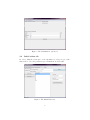
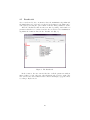
explained in section 3, the main window should look like in Fig. 3:
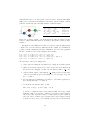
Figure 3: The main window with the Goutsias’ transcription model
The user can save the list of the reactions selecting the “Save reactions...”
4