1
Servicing the Device
5.3
Slow Temperature Changes:
For slow temperature changes with a time constant of seconds you can use the Peltier element (with the heat
exchanger). This allows for a more precise temperature regulation, because on the feedback the end capillary
Tw is used. You can call up this new mode via F button (balance off). This button also switches between this
mode and the normal mode, The character p on the display (before UeV) indicates that the command voltage
UeV on the BNC input will be taken as required temperature at the capillary output (1V~10oC). This means
that the feedback is closed via Tw.
6. Servicing the Device
The device has two electrochemical power sources, a lead accumulator WP1.5-12V and a Lithium battery 3V
The main board uses a Lithium battery 3V, type CR2032 (Panasonic). The battery supplies also power to the
serial memory to save important data in case of unexpected power outages.
The electrically isolated circuits of the thermocouples Tw a Tc are supplied by a hermetically sealed lead accumulator WP1.5-12V, 1,5 Ah.
6.1
General Notes
Make sure that the power is switched on while not operating the device to charge the installed accumulator
12V/1,5Ah. The LED diode V indicates whether the accumulator is being charged. The LED diode I indicates
the charging current. The max. value is 130mA. When the device is operated, the green resp. red light of the
diode V indicates whether the accumulator is charged or not.
The device may be damaged if used in any other way than described in this manual.
6.2
Cleaning the device
Use a dry soft cloth for cleaning the WAS02.
At least once a month it is necessary to clean the valves of the type General Valve:
•
•
•
•
•
•
•
•
6.3
Neodisher (detergent) 0,03g/100ml (or only distilled water). Neodisher A8 for dishwashers,
Chemische Fabrik Dr. Weigert GmbH & CO., http://www.drweigert.com
1M HCl
Distilled water
1M NaOH
Distilled water
96% Ethanol
Distilled water
Compressed air
Exchanging the Battery
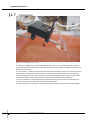
If the displayed time (can be set via program WAS02) is wrong, then probably the battery CR2031 needs to
be exchanged. This can be done as follows:
•
disconnect power source
•
remove the inner cover of the device
•
remove protective earthing cable from the cover
•
Replace the battery (bottom printed board)
•
Reconnect the earthing cable and the cover
WAS02 - Windows Application System
17