1
Chapter 5 - User interface
buffer may be expanded (obj_expand) and the selection is adjusted to include the geometry at
the next level up in the hierarchy.
5.6 Informal user evaluations
The user interface was developed using an iterative design approach to take initial ideas
and then produce a more mature interface over time. At each stage of the design, the TinmithMetro modelling application was used to test the interaction techniques with both myself as
well as novice users to gain their feedback. Brooks discusses insight into the design of user
interfaces and states that the uninformed and untested intuition of the designer is almost
always wrong [BROO88]. He suggests that interfaces must be refined with real users, and this
section discusses the studies performed and the changes that were made based on this
feedback.
5.6.1 Initial design
As discussed previously, I decided that the use of tracked pinch gloves for pointing and
command entry would be an efficient way of interacting with 3D objects in an outdoor AR
environment. The initial idea was to use gloves with metallic pads that would allow finger tip
to thumb, finger middle to thumb, and finger tip to palm inputs (similar to the Kitty hand
worn keyboard [KITT02]), with a total of 24 menu options (12 for each hand) available at any
time to select from. While allowing a large number of items at any particular time, I found
this design to be uncomfortable when I tried to select all 24 inputs. The presentation of 24
menu options on the display would also produce a confusing menu for conveying the
appropriate finger mappings and consume a large amount of screen area. To keep the menu
simple and within the limits of human dexterity, the design was reduced to having a single
menu node for each finger, and by pressing the fingers into the palm the menu would reset to
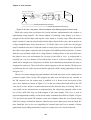
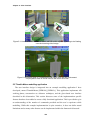
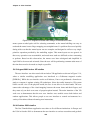
the top level. To present the layout of the menu, a horizontal strip of menu options was fixed
across the bottom of the display to correspond with the layout of the hands when they are laid
out flat. Figure 5-15 shows the layout of the user interface with the horizontal menu options
presented within a transparent green window.
5.6.2 May 2001 studies
The initial user interface implementation was designed to support the first Tinmith-Metro
modelling investigations [PIEK01b]. The first evaluation of the design with a functional
application was performed in May 2001. This evaluation was performed by my supervisor
and I, who were both very familiar with the Tinmith-Metro software and user interface. The
138