1
¨
FleetSync Selective calling
FleetSync protocol will allow a radio user to select and alert a specific radio or a specific group of radios
that a call has been received. This can keep the other radio users in the same talk group from hearing
unwanted radio conversations. This FleetSync feature is similar to and should be used in the same way as
Two Tone paging. The radio once alerted can sound a alert tone or initiate the Horn Honk feature. NOTE:
Because of the limitations of low speed signaling such as LTR or CTCSS this feature does not lend
itself well to being used as a direct connect private call feature.
There are 4 types of selective alerts. Broadcasts, Fleet, Supervisor and individual calls. A broadcast, Fleet
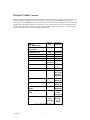
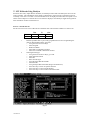
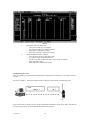
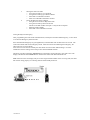
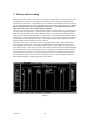
and Supervisor will incorporate 0 as a wild card in the target ID. In the KPG-49D programming software
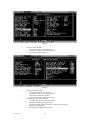
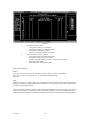
when a 0 is entered the word “ALL” will be displayed (see Fig 13). For example in a Broadcast alert the
target ID will be Fleet ID 0 Individual ID 0. In a Fleet wide alert the target ID would be Fleet ID 100 and
individual ID 0. This ID would alert all units within Fleet 100. A supervisor call would use a Fleet ID of 0
and the supervisors individual ID such as 1001. In this example all units with the individual ID of 1001
would be alerted no matter which Fleet the users resides in.
When decoding an Selective call alert, the radio can be programmed for either a AND or OR condition.
This controls the muting of audio. If the radio is programmed for the OR condition then either the low
speed signaling protocol (LTR/CTCSS) OR the FleetSync selective call signaling will cause the radio to
open squelch and Alert. If the radio is set for the AND condition the radio will remain muted until both the
low speed signaling protocol and the FleetSync selective call signaling is decoded. Once both conditions
have been met the radio will alert. The radio will alert for the duration of the Message Mode timer then
reset itself back to its normal operation. If the Message mode timer is set to OFF the radio will stop all
scanning and alert until the user resets the alert with the Monitor button. See the Application guide for
more detailed information on suitable applications for this feature.
Figure 13
11/01 Rev 2.0
19