1
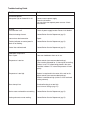
Troubleshooting Guide
Problem:
Unit fails to operate
Main power light on Control #1 is off.
Action:
Connect case to power supply.
Reset circuit breaker.
Unit may have two separate power sources. Check
both sources.
No Heat
Circuit breaker is off.
Check all power supply breaker. Reset circuit breaker.
Defective heating element.
Contact Barker Service Department (pg 15).
Loose wire or bad connection.
Repair.
Flashing indicator on control panel is
blank or not flashing.
Contact Barker Service Department (pg 15).
Control has malfunctioned.
Contact Barker Service Department (pg 15).
Inadequate Temperature
Door is open.
Close rear load doors when not in use.
Temperature is too low.
Adjust controls (see recommended settings).
Case must be preheated for 1½ hours prior to stocking.
Product is not 175° before being placed in the case.
Food that is below 175° internal temperature will cool
quickly.
Temperature is too high.
Product is not placed in the center of the well or tile.
Adjust controls (see recommended settings).
Product is stacked too high (within 6" of the overhead
heating element).
Glass clamp is hot.
Overhead heating is set too high
(see Common Settings page 10).
Service case overhead fan not working
Contact Barker Service Department (pg 15).
Heating elements are not working.
Contact Barker Service Department (pg 15).