1
Configuring the FLEXlm License Manager
2-7
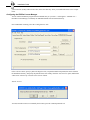
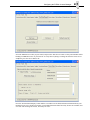
Select the FEMAP service that you just created, and press the "Start Server" button. At this point FLEXlm will be
handing out FEMAP licenses on your network. To verify that everything is working fine from the license server
standpoint, press the "Server Status" tab.
Press the "Perform Status Enquiry" button and the text window will be filled with status information about your
FLEXlm license server. In the text window you will find information about how many licenses are available, and
once user start checking out licenses, how many are in use.