1
CA User Guide Version 1.11
can be used to search over this metadata and try to match the services to the query request.
This is also described in the licas documentation.
The main difference with this panel from the web service one is a new section for entering
the other licas admin fields. The main ones are the access levels. Each level requires a name
and a password. The Add Level button will then add a new level. The currently selected
method can then be added to the currently selected level through the Add Method button.
The other metadata fields are added through the right-hand side Type and Value boxes.
The Type box defines what field you want to add. If this requires a text entry, you can enter
the text into the Value field and click the Add Value button. If this requires an XML
element or document, you can click the Open button. Depending on what field type is
selected, the open operation either selects a text document and displays it in a text form, or it
opens a new form for selecting classes from a jar file. You can play about with adding
different field types until you become familiar with the different options.
3.6.1 The Text Form
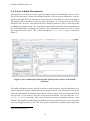
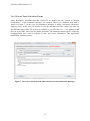
If fields such as Data or Other Meta are selected, then the open operation browses for an
XML document and opens it in a text form. This is shown in Figure 6. The name of the field
is shown at the top of the form. You can either select the whole document through the
Select All button, or highlight the part of the document to select. Clicking the Add
Text button will then add the text to the field element in the main admin document. Note
that the highlighted section should start and end with the same element. Selecting two
‘manufacturer’ sections here, for example, will only save the first one.
Figure 6. Text form with text selected for the data field.
16