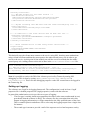
1
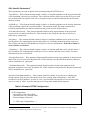
SSL Specific Parameters1
These parameters are only required when operating using the HTTPS server.
<PrivateKey>- This element should contain a relative or absolute path that can be used to determine
a file containing a private key certificate. This certificate will be used to secure the SSL server and
may or may not be encrypted. If the file is encrypted, however, the PrivateKeyPassword element
must be present.
<PublicKey> - This element should contain a relative or absolute path that can be used to determine
a file containing a public key certificate(PKC). The contents of this file must contain a PKC
certificate that matches the details contained in the private key file defined above.
<PrivateKeyPassword> - This element should contain a string representation of the password
required to access the Private Key file. This element is only required when the private key is
protected by a password.
<KeyStore> - This element should contain a relative or absolute path that can be used to create a
Java KeyStore file containing the private and public key certificates loaded from their respective
files. Please note that this file should not exist prior to service initialisation. If the file is found to
exist it will be overwritten.
<TrustStore> - This element should contain a relative or absolute path that can be used to locate a
Java TrustStore file containing the certificates of server entities that the service trusts. For more
information please see Section 4.
<KeyStorePassword> - This optional element should contain a string representation of the password
that will be used to access the KeyStore file. If this element is not present the KeyStore password
will be assumed to be “password”.
<TrustStorePassword> - This optional element should contain a string representation of the
password required to access the TrustStore file. If this element is not present the KeyStore password
will be assumed to be “password”.
<RequireClientAuthentication> - This element specifies whether or not the server should only
accept requests from servers with whom it has a pre-existing trust relationship i.e. their SSL
certificate is in the TrustStore. A value of “true” specifies that only trusted servers can access the
service a value of “false” specifies that any server may make authorisation requests.
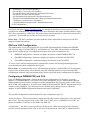
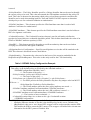
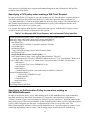
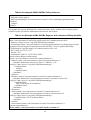
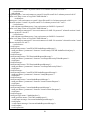
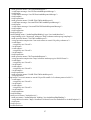
Table 2. Example HTTPS Configuration
<TCPConfiguration>
<ServerPort>1104</ServerPort>
<ThreadCount>10</ThreadCount>
<Protocol>https</Protocol>
<!-- SSL only Configurations -->
1
If you want to use SSL, it is better to install the service inside a servlet container like Tomcat. The SSL support
provided by the standalone application is flaky at best.
8