1
Type 8022
Setting and Functions
9.
Setting and Functions
9.1.
Display and control keys
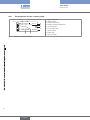
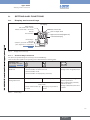
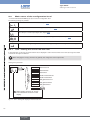
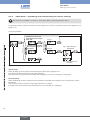
LC display
Status display:
with check mark = active
without check mark = not active
Unit of flow rate
K factor
Process Value
Unit of output value
Upper/Lower limit (High/Low)
4-character display
Control keys:
Keys for
selection, input and confirmation
(see chapter 9.1.1. Control key
functions)

Fig. 7:
Display and control keys
9.1.1. Control key functions
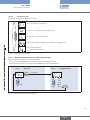
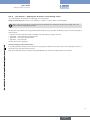
The device is operated using two arrow keys and one ENTER key.
Their function with regards to the operating level is described in the following table.
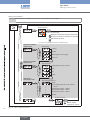
Operating level
(see chapter 9.3. Operating levels)
Level 1: Read level
Switching over the display value from:
Press and hold for 3 s:
• PV ProcessValue in set flow rate unit
Change to the configuration level
• PV ProcessValue in mA
• PV ProcessValue in Hz (frequency of sensor)
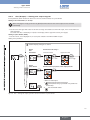
Level 2:
Configuration level
Scroll up (select).
Scroll down (select).
Enter values
Increase numerical value by
one value.
Change by one position to
the left.
Confirm parameter, change
between parameters.
Select and deselect parameter,
confirm set values.
Change to Read level when End
is shown
Tab. 1: Control keys
13
English