1
Connections
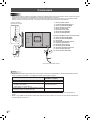
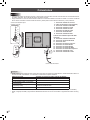
Caution
• Be sure to turn off the main power switch and disconnect the plug from the power outlet before connecting/disconnecting
cables. Also, read the manual of the equipment to be connected.
• Be careful not to confuse the input terminal with the output terminal when connecting cables. Accidentally reversing cables
connected to the input and output terminals may cause malfunctions and the other problems.
1.
2.
3.
4.
5.
6.
7.
8.
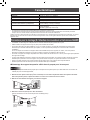
When the PN-ZB01
(optional) is attached
9
10
11
12
13
14
16
When the PN-ZB01 (optional) is attached
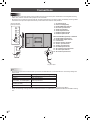
9. PC/AV DVI-D input terminal
10. PC/AV DVI-D output terminal
11. LAN terminal
12. External speaker terminals
13. Audio 1 input terminals
14. Audio 2 input terminals
15. PC RGB input terminals
16. AV component input terminals
17. AV video input terminal
18. AV S-video input terminal
15
17
18
3
8
1
4
5
6
7
AC input terminal
Power cord (Supplied)
PC/AV HDMI input terminal
PC D-sub input terminal
Audio input terminal
Audio output terminals
RS-232C output terminal
RS-232C input terminal
2
For power outlet
TIPS
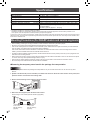
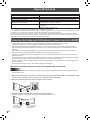
• Set the audio input terminal used for each input mode in AUDIO SELECT on the OPTION menu. The factory settings are
shown below.
Input mode
PC D-SUB, PC DVI-D, PC RGB
AV DVI-D
AV component (BNC),
AV S-video , AV video (BNC)
AV COMPONENT (D-SUB),
AV video (D-SUB)
PC HDMI, AV HDMI
Audio input terminal (Factory setting)
Audio input terminal
Audio1 input terminal
Audio2 input terminal
Audio input terminal
PC/AV HDMI input terminal
• When connecting the external speaker, attach the speaker cable core (included in the optional PN-ZB01).
• HDMI, the HDMI logo and High-Definition Multimedia Interface are trademarks or registered trademarks of HDMI Licensing
LLC.
E
6