1
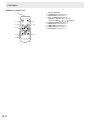
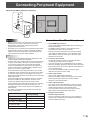
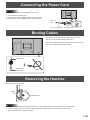
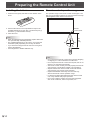
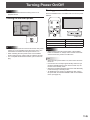
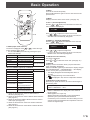
Contents IMPORTANT INFORMATION.............................................3 DEAR SHARP CUSTOMER...............................................4 SAFETY PRECAUTIONS...................................................4 TIPS AND SAFETY INSTRUCTIONS................................6 MOUNTING PRECAUTIONS.............................................7 Supplied Components......................................................8 Part Names........................................................................9 Connecting Peripheral Equipment................................ 11 Connection with a PC or AV equipment...................... 11 Connection when the PN-ZB01 (optional) is attached..................................................................12 Connecting the Power Cord..........................................13 Binding Cables................................................................13 Removing the Handles...................................................13 Preparing the Remote Control Unit...............................14 Installing the batteries.................................................14 Remote control operation range..................................14 Turning Power On/Off.....................................................15 Turning on the main power.........................................15 Turning power on/off...................................................15 Disabling power on/off operations...............................16 Basic Operation..............................................................17 Menu Items......................................................................19 Displaying the menu screen........................................19 Menu item details........................................................20 Adjustments for PC screen display.............................27 Initialization (Reset)/Functional Restriction Setting (FUNCTION).....................................................................28 Controlling the Monitor with a PC (RS-232C)...............29 PC connection.............................................................29 Communication conditions..........................................29 Communication procedure..........................................29 Setting of the GAMMA user data.................................32 RS-232C command table............................................33 Controlling the Monitor with a PC (LAN)......................41 Settings to connect to a LAN.......................................41 Controlling with a PC...................................................43 Troubleshooting..............................................................49 Specifications ................................................................51 Mounting Precautions (For SHARP dealers and service engineers)................55 Supplied Components If any component should be missing, please contact your dealer. Liquid Crystal Display Monitor: 1 Remote control unit: 1 Cable clamp: 2 Power cord: 1 R-6 battery (“AA” size): 2 CD-ROM (Utility Disk for Windows): 1 Setup Manual: 1 Cover: 2 Cover screws (M4 with washers): 4 Vertical sticker (Operation panel): 1 Vertical sticker (Logo): 1 erminal label: 1 T Used when installing the expansion board PN-ZB01 (optional). over Sharp logo: 1 C Place this sticker onto the SHARP logo to cover the logo. * Sharp Corporation holds authorship rights to the Utility Disk program. Do not reproduce it without permission. * For environmental protection! Do not dispose of batteries in household waste. Follow the disposal instructions for your area. E 8