1
USBthere USB110EXT/USB120EXT
USB Cables
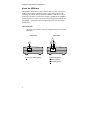
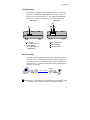
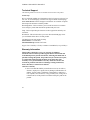
USB cables have two distinct connectors. The Type A connector is used to
connect the cable from a USB device to the Type A port on a computer or
hub. The Type B connector is used to attach the USB cable to a USB device.
USB Type A
port
USB Type A
connector
USB Type B
port
USB Type B
connector
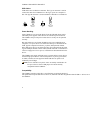
Power Handling
Some USB devices are powered directly from the USB and do not require
individual power supplies. These devices are called bus-powered devices.
The USBthere can provide power to these devices so they can be operated
remotely.
Bus-powered devices are further divided into low-power and high-power
categories. Low-power devices are allowed to draw up to 100 mA from the
USB. Typical examples include mice, joysticks, and keyboards without
hubs. High-power devices are allowed to draw up to 500 mA from the USB.
Typical examples include cameras and keyboards with hubs. To determine if
a device is high-power or low-power, consult the user documentation for the
device.
The USBthere can supply sufficient power to support all low-power devices
and most high-power devices. Devices that place a very heavy power drain
on USB (>300 mA) are not supported. Most USB devices operate well
within this power budget.
NOTE:
Devices with their own power source are usually considered to be
low-power devices from a USB perspective and are thereby
compatible with the USBthere.
Compatibility
The USBthere complies with USB 1.1 specifications governing the design of
full-speed and low-speed USB devices. However, StarTech.com does not guarantee that all USB 1.1 devices are co
the USBthere.
4