1
Appendix
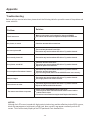
Troubleshooting
Before calling a service technician, please check the following table for a possible cause of the problem and
some solutions.
Problem
Solution
TV will not turn on
Make sure the power cord is plugged in, then press POWER.
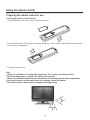
The remote control batteries may be dead. Replace the batteries.
No picture, no sound
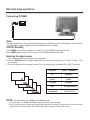
Check the antenna/cable connections.
No sound, picture OK
The sound may be muted. Press VOL+.
The station may have broadcast difficulties. Try another channel.
Poor sound, picture OK
The station may have broadcast difficulties. Try another channel
Poor picture, sound OK
Check the antenna connections.
The station may have broadcast difficulties. Try another channel.
Adjust the picture from the menu.
Poor reception of broadcast channels
The station may have broadcast difficulties. Try another channel.
Check the antenna connections.
If you are using a VCR, make sure the SOURCE button is set correctly.
Multiple images
The station may have broadcast difficulties. Try another channel.
Use a highly directional outdoor antenna.
Poor colour or no color
The station may have broadcast difficulties. Try another channel.
Adjust the TINT and COLOR in the menu.
The remote control does not operate
Check to see if the SOURCE mode is properly set.
There may be an obstruction between the remote control and the
remote control sensor.
The remote control batteries may be dead. Replace the batteries.
NOTICE:
Although the LCD screen is made with high-precision technology and has effective pixels of 99% or more,
black dots may appear or bright points of light (red, blue or green) may appear constantly on the LCD
screen. This is a structural property of the LCD panel and is not a malfunction.
-20-