1
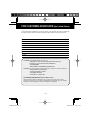
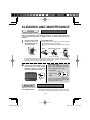
CLEANING AND MAINTENANCE
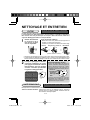
FILTER
Every week or more often if necessary
The filter must be cleaned regularly in order to maintain the ion density.
Filter soiling depends on the usage environment, so clean the filter about once
a week or whenever the filter is clogged, even if the Filter Clean Light has not
turned on.
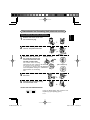
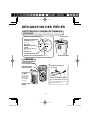
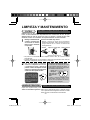
1
Gently remove dust
from the filter of
back side by using a
vacuum cleaner.
<For Stubborn Dirt>
• Remove and rinse in water. (Use a soft sponge if
the dirt does not come off easily.)
Be careful the cushioning material does not come
off.
Rinse
Wipe with a dry cloth.
Reattach
Filter
(Dry in the shade.)
• Do not press the vacuum cleaner strongly against the filter, or the filter could be damaged.
• If using synthetic kitchen detergent, rinse well to remove all traces of the
detergent. Also, be sure to dry the filter in the shade.
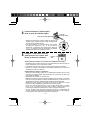
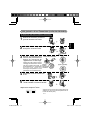
2
Once cleaning is completed,
connect the car adapter, then
press and hold in the Reset
Button for at least 3 seconds to
turn off the filter clean light.
Filter Clean Light
Filter Clean Light will be lit after
approx. 3 month (approx. 720 hours),
when operated 8 hours a day.
Reset Button
Even if the Filter
Clean Light is off,
press and hold in the
Reset Button for at
least 3 seconds after
cleaning.
MAIN UNIT
RESET
(Press 3sec.)
Filter Clean
Light
FILTER
CLEAN
RESET
(Press 3sec.)
UNIT
MODE
MODE
When the Reset Button is pressed and
held in for at least 3 seconds, the light
flashes twice then turns off.
Every month or more often if necessary
Wipe with a dry soft cloth.t>
<For Stubborn Dirt>
Use water and a mild detergent. And then, wipe
with a wet cloth. Make sure to dry out the main unit.
E-12
IG-BC2U.EN.indd 14
2010/10/13 16:35:27