1
Instructions for iPF825
8
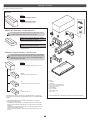
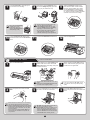
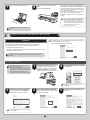
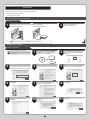
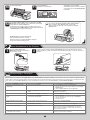
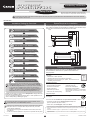
Use the Roll Unit Cable to connect the port on the back of the roll
unit to the Roll Unit Port on the back of the printer.
Set Up the Output Stacker
MEMO
• Insert the Roll Unit Cable firmly, all the way in.
Set up the wheeled or stationary output stacker to catch ejected documents.
For instructions on setting up the output stacker, refer to the Printer Stand Setup Guide provided with the stand.
Attach the Media Take-up Unit
(Optional for the iPF815)
For the Media Take-up Unit installation instructions, refer to the setup guide provided with the unit.
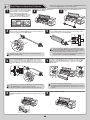
Remove the Packaging Material
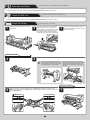
Remove the protective packaging material from the printer.
1
Remove the tape and other packaging material used to secure the
printer.
2
3
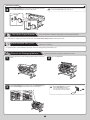
Use the Allen Wrench to loosen the screw of the Belt Stopper (a).
Rotate the Belt Stopper to the left and remove the stopper.
Open the Top Cover.
MEMO
a
4
• Keep the Belt Stopper you removed
and the Allen Wrench for future
use. You will need them in case you
move the printer to another location.