1
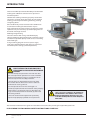
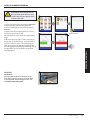
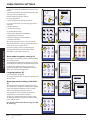
USB oven programs (J)
IMPORTANT: Downloading from a USB will clear
all the existing programs.
Check that the key has the correct number/code
for the programs you want to load into the oven
memory.
Select USB from the settings screen.
Slide the USB cover (logo on the oven front)
upwards to insert the USB into the slot.
When the inserted USB stick has finished flashing,
select the required USB symbol, for example;
RECIPES.
Select the new file using the scroll arrows if
required to locate the file. Note; a tinted band over
a file name indicates the file is not available to use.
Double check the file is correct before selecting
OK, if not, select ‘X’ and locate the correct file.
Progress of the file update is displayed. Once
completed the oven restarts and commences
heating up to the PREHEAT temperature ready to
cook.
Remove the USB and keep in a safe place.
Reposition the USB cover.
J
K
OPERATION & CONTROLS
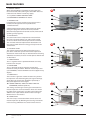
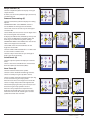
Restore Factory Defaults (K)
Select the factory symbol to replace the existing
oven settings with the original factory default
settings. Note; this action cannot be undone.
Select OK, or select the red cross to cancel and
keep the existing settings.
L
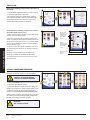
Temperature Band (L)
Select the ‘Temp Band’ symbol at which the oven
controls i.e. ±10°C.
Select the required temperature band checkbox,
shown by a green tick. Note; although the lowest
practical Temp Band should be used, if the set oven
temperature falls by more than the selected Temp
Band, the ready to cook mode and Temp Band are
deactivated until the oven reaches the preheat
temperature.
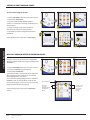
Change Password (M)
Select the key symbol to change the oven
passwords.
Select the oven Settings or Service symbol.
Enter the existing password and select OK to
confirm.
Enter the new password, select OK.
Confirm new password, select OK.
22
Installation and Operating original instructions.
Part Number 32Z3797 GB
Issue 1
M