1
ASC-39320D IG.fm Page 5 Thursday, June 13, 2002 10:53 AM
The Adaptec SCSI Card 39320D is preset to ID 7 for each channel
and should not be changed. If you boot from a SCSI hard disk,
make sure the hard disk SCSI ID is set to 0. (Most SCSI hard disks
are preset to SCSI ID 0 at the factory.) The SCSI IDs for internal
devices are usually set with jumpers; SCSI IDs for external
devices are usually set with a switch on the back of the device.
Terminate the Ends
To ensure reliable communication on the SCSI bus, the device at
the end of each cable, or the end of the cable itself, must have a
terminator installed (or enabled). Terminators must be removed,
or termination must be disabled, on devices between the ends of
each cable.
NOTE When connecting Ultra320/160 or Ultra2 SCSI devices,
the SCSI bus must be terminated either on the end of the cable
(with a permanent terminator) or with a separate terminating
connector. Ultra SCSI and earlier single-ended devices can
terminate the bus directly from the device. If you use an Ultra
SCSI terminator on an LVD Ultra320/160 and Ultra2 SCSI bus,
the SCSI devices will not operate properly. For this reason be
sure that you have the necessary Ultra320/160 or Ultra2 cable
and terminator before installing the Ultra320/160 SCSI
devices.
CONNECTING SCSI DEVICES
You can connect a total of 30 SCSI devices to the Adaptec SCSI
Card 39320D,with up to 15 devices on each SCSI channel. Before
connecting devices, be sure to review Setting Up SCSI Devices on
page 4.
Connecting Internal Ultra320/160 and Ultra2 Devices
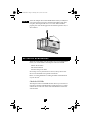
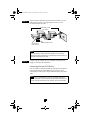
A special 68-pin internal LVD cable is needed to connect internal
Ultra320/160 or Ultra2 SCSI devices. If your cables are not
marked, you can identify most LVD cables as having twisted
pairs of the flat ribbon cable between the device connectors. Some
cables are laminated so that they lay flat. Internal LVD cables
usually have a terminator built into the end of the cable.
5