1
Setting Up the Projector
Setting Up the Projector
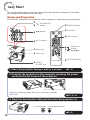
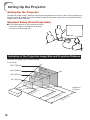
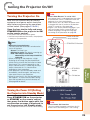
For optimal image quality, position the projector perpendicular to the screen with the projector's
feet flat and level. Doing so will eliminate the need for Keystone correction and provide the best
image quality. (See page 28.)
Standard Setup (Front Projection)
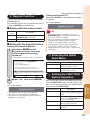
■ Place the projector at the required distance
from the screen according to the desired
picture size. (See page 19.)
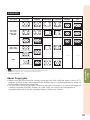
Indication of the Projection Image Size and Projection Distance
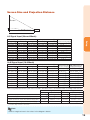
Example: 4:3 Signal Input (Normal Mode)
Picture Size
300" (762 cm)
200" (508 cm)
100" (254 cm)
40" (102 cm)
240
"
(610 ×180"
cm
× 45
160
7 cm
"×12
)
0"
(406
c
m×
80"×
305
60"
cm)
(203
cm ×
152
cm)
32"×
2
(81 cm 4"
× 61 c
m)
18
11
(3 '4
.5 "–
m 1
– 4 3'
.2 9"
22
m
)
(6 '8
.9 "–
m 2
– 8 7'
.4 6"
34
m
)
(1 '0
0. "–
4 4
m 1
– 1 '3
2. "
6
m
)
4'
(1 6"–
.4 5
m '6
–1 "
.7
m
)
Projection
Distance