1
DIAGNOSING PRINT QUALITY ISSUES CONTINUED
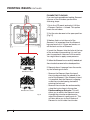
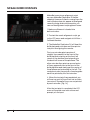
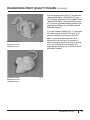
If you are overextruding [Fig. 1.6], increase the
“feedstockMultiplier” setting by 0.05, save
the config file, and Export your file again. If the
“feedstockMultiplier” setting reaches a value
of 1.0 without the problem being resolved, you
might have a different issue. Please contact
MakerBot Support.
File Name: 3D mouse
Fig. 1.6
Design by: DDStarkey
Thingiverse: 61909
File Name: 3D mouse
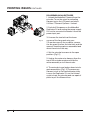
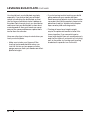
If you are underextruding [Fig. 1.7], decrease
the “feedstockMultiplier” setting by 0.05,
save the config file, and Export your file
again. Continue to decrease the value
entered for this setting in increments. If,
after lowering the default setting by a total
of 0.2, your results do not improve, you
might have a different issue. Please contact
MakerBot Support.
Fig. 1.7
Design by: DDStarkey
Thingiverse: 31909
TROUBLESHOOTING
25