1
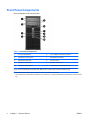
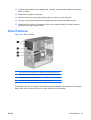
Front Panel Components
Drive configuration may vary by model.
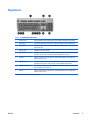
Table 1-1 Front Panel Components
1
5.25-inch Optical Drives1
6
3.5-inch Media Card Reader (optional)2
2
Optical Drive Activity Lights
7
Dual-State Power Button
3
Hard Drive Activity Light
8
Power On Light
4
Microphone Connector
9
Headphone Connector
5
Optical Drive Eject Buttons
10
USB (Universal Serial Bus) 2.0 Ports
NOTE: The Power On Light is normally green when the power is on. If it is flashing red, there is a problem with the
computer and it is displaying a diagnostic code. Refer to the Troubleshooting Guide to interpret the code.
1
Some models have bezel blanks covering one or both of the 5.25-inch drive bays.
2
Some models have a bezel blank covering the 3.5-inch drive bay. An optional diskette drive is available from HP for this drive
bay.
2
Chapter 1 Product Features
ENWW