1
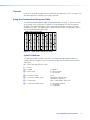
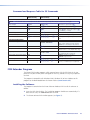
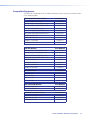
Command and Response Table for SIS Commands
Command
ASCII Command
(host to unit)
Response
(unit to host)
Additional Description
Channel Mute
NOTE:
The channel mute commands mute the data on the output only. The output continues to emit light.
Show video mute status
X!*1B
X!*0B
X!B
X@]
Mute all outputs
1*B
Vmt1]
Unmute all outputs
0*B
Vmt0]
Show mute status of all outputs
EVM}
X@ X@ X@ X@
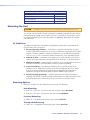
Information Requests
Information request
I
V01X08•A00X00]
Show firmware version
Q
Example:
Q
X#]
1.23]
Request part number
N
60-927-nn]
Show input connections status
0LS
X$]
Show temperature
20S
X%]
X^1X^2X^3X^4 ... X^8]
Mute output
Unmute output
Show transceiver module status 0*1I
VmtX!*1]
Blank data on optical output X!.
VmtX!*0]
Output data on optical output
1
2
X!.
Output X! data output mute status is
(0 = unmuted, 1 = muted).
Blank data on all optical outputs.
X@
Output data on all optical outputs.
3
4
...
X@ ]
8
Show output 1 through output 8 mute
status.
V01X08 shows the number of available
inputs (1) and outputs (8) for this product.
A00X00 has no meaning for this product.
The factory-installed FOX DA8 controller
firmware version is 1.23 (sample value only).
nn indicates the transmission mode.
01 = multimode, 02 = singlemode.
0000000 = no light on the input,
10000000 = light received.
X% = degrees Fahrenheit.
Show all installed transceiver modules.
0 = none, 1 = multimode, 2 = singlemode.
FOX Extender Program
The Extron FOX Extender program, which communicates with the FOX DA8 via the rear
panel RS-232 port or front panel Config port of the unit, provides an easy way to operate
the DA8.
The program is compatible with Windows 2000, Windows XP, or later. Updates to this
program can be downloaded from the Extron website (www.extron.com).
Installing the Software
The program is contained on the Extron Software Products DVD. Install the software as
follows:
1. Insert the DVD into the drive. The installation program should start automatically. If it
does not self-start, run Launch.exe from the DVD.
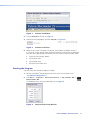
2. The Extron software DVD window appears (see figure 7).
Extron FOX DA8 • Remote Control
10