1
User Manual
Computer Program „BOECO WINPC”
Manual number:
01 2015-07-ENG
Version: 5.X.X
Boeckel + Co (GmbH + Co) KG
Roedingsmarkt 33
20459 Hamburg
Germany
Phone: + 49 40 325627-0
Fax: + 49 40 325627-41
E-mail: [email protected]
Internet: www.boeco.com
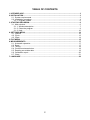
TABLE OF CONTENTS
1. INTENDED USE ..................................................................................................................... 3
2. INSTALLATION ..................................................................................................................... 3
2.1. System requirements..................................................................................................... 3
2.2. Installation procedure .................................................................................................... 4
2.2.1. Program update ..................................................................................................... 6
3. STARTING PROGRAM.......................................................................................................... 6
3.1. Main window.................................................................................................................. 6
3.1.1. Window description................................................................................................ 7
3.1.2. Close the program ................................................................................................. 9
3.1.3. Help...................................................................................................................... 10
4. SETTINGS MENU ................................................................................................................ 10
4.1. Options ........................................................................................................................ 10
4.2. Cycle............................................................................................................................ 13
4.3. Chart............................................................................................................................ 14
5. FILE MENU .......................................................................................................................... 15
6. MEASUREMENTS ............................................................................................................... 17
6.1. Automatic operation..................................................................................................... 17
6.2. Read ............................................................................................................................ 17
6.3. Tarring ......................................................................................................................... 18
6.4. Continuous transmission ............................................................................................. 18
6.5. Reading non-stable data ............................................................................................. 19
6.6. Calibration report ......................................................................................................... 20
6.7. Chart............................................................................................................................ 21
7. LANGUAGE ......................................................................................................................... 22
2
1. INTENDED USE
Program „ BOECO WINPC” has been designed for collecting
measurement data form scales made by BOECO and performing some
statistical calculations.
Basic program functions:
•
•
•
•
•
•
Reading data from scales, recording measurements in a file,
Possibility of manual or automatic readings of measurements,
archiving of measurement data in a file,
visualization of measurement data in a chart,
statistical processing of measurement data,
creating reports from the selected set of measurements.
Notice:
Boeco shall not be liable for any errors resulting from wrong use
of the program.
2. INSTALLATION
2.1. System requirements
Minimum requirements:
• Processor INTEL or AMD >= 1200 MHz,
• RAM minimum 256 MB (recommended 512 MB),
• Graphic card SVGA (resolution minimum 1024x768 with 24-bit
colour palette),
• Communication port RS-232,
• Free space on a Hard Drive >=1 GB,
• Mouse,
• Keyboard,
• A colour monitor with a resolution of 1024x768,
• System Windows XP/2000/Vista/7,
• Printer (format A4),
• Software for reading pdf files (for manuals),
• Basic computer operation skills.
3
2.2. Installation procedure
In order to install the program put the installation CD to the CD-ROM
drive. An installation program of „BOECO WINPC” should start running
automatically. If the installation is to be performed manually run program
<Install_BOECO_WINPC_5.x.x.exe> in the main folder of the CD.
Follow the instructions in the subsequent windows.
The welcome window of the installation wizard:
Press „Next” to continue.
4
The Ready to Install window:
Press button „Install” to continue.
The installation completion window:
Then „BOECO WINPC” will be quickly installed.
Press „Finish” to close the installation wizard.
5
2.2.1. Program update
In case when program „ BOECO WINPC” has already been installed on a
computer and when the user starts to install a new version of the program,
the whole installation process is similar to that when it is installed for the
first time.
Notice:
Before the installation wizard is started it is advisable to make
a backup copy for the program folder. Default folder is:
<C:\Program Files (x86)\Boeco\BOECO WINPC\>.
3. STARTING PROGRAM
The program may be run by clicking the shortcut icon on the desktop:
The program may also be started from the START menu:
„START/Programms/Boeco/BOECO WINPC”.
3.1. Main window
After starting the program the main window is displayed:
6
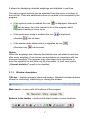
It allows for displaying collected weighings and statistics in real time.
The main program options can be accessed from the menu or buttons in
the tool bar. There are additional buttons to set data to be accepted by the
program:
• It the cyclical mode is enabled the icon
is displayed, otherwise
can be seen, the cycle interval is set in the program which
requests a reading in every cycle.
• If the continuous mode is enables the icon
otherwise
is displayed,
can be seen,
• If the scales sends stable data it is signalled by icon
otherwise icon
,
can be seen.
Notice:
When the weighings are collected the statistics are calculated in real time
after every weighing. It can cause some problems on computers with low
processor capacity. The program may slow down some operations or
even the operation in real time may be impossible. In such case option
„Current statistics” needs to be disabled.
3.1.1. Window description
Title bar – displays program name and version. Standard windows buttons
allows for minimizing, maximizing or closing the window:
Main menu – a menu with all functions of the program:
Buttons in the toolbar – buttons with direct access to some functions:
7
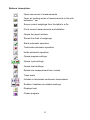
Buttons’ description:
Open new series of measurements
Open an existing series of measurements in file with
extension *.ser
Saves current weighings from the table to a file
Prints current measurements and statistics
Opens the report window
Shows the chart of weighings
Starts automatic operation
Terminates automatic operation
Holds automatic operation
Opens program settings
Opens cycle settings
Opens chart settings
Reads one measurement from a scale
Tares scale
Initiates or terminates continuous transmission
Enables / disables non-stable readings
Displays help
Closes program
8
Table of measurements – an area for displaying measurements:
Window of Statistics – displays statistical information about
measurements.
After choosing one of options „Accept measurements no lower /
no superior”, a window to describe a limit value will appear.
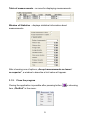
3.1.2. Close the program
Closing the application is possible after pressing button
item „File/Exit” in the menu:
9
or choosing
Closing the program and some windows is preceded by displaying a
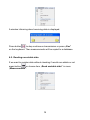
dialogue window to confirm or contradict the operation.:
3.1.3. Help
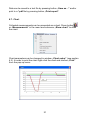
Info window will be displayed after pressing
in the menu:
or choosing item „Help”
4. SETTINGS MENU
4.1. Options
The access to menu item „Options” is possible after pressing button
or entering submenu „Settings/Options”:
In menu „Options” parameters of communication with a scale are set.
Connect the scale to an RS232 COM port or Ethernet and then carry out
configuration of parameters according to the description.
10
Communication
The button for accessing a configuration window for defining the
connection with a scale.
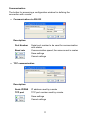
• Communication via RS-232
Description:
Port Number
Baud rate
Serial port number to be used for communication
with scales
Communication speed, the same as set in scales
Save settings
Cancel settings
• TCP communication
Description:
Scale IP/DNS
IP address used by a scale
TCP port
TCP port number used by a scale
Save settings
Cancel settings
11
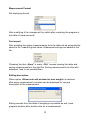
Measurement Format
Set displaying format.
After modifying it the changes will be visible after restarting the program in
the table of measurements.
Fast export
After enabling the option measurements from the table will be automatically
saved to file *.csv with given name. Subsequent savings are added to the
file.
Choosing the item „Save” in menu „File” causes clearing the table and
saving measurements in the right file. Saving measurements to a file with
extension *.ser is not possible then.
Editing description
When option <Show note edit window for new weight> is selected,
after every measurement a window can be displayed for typing a
description of the measurement.
Editing records form the table of weighings is possible as well (main
program window) after double-click on a measurement.
12
Saving remainder
When option <Show message reminds on save measurements> is
selected then when 18 measurements are overpassed, so the list in the
table of measurement is full, the message window will be displayed.
All changes in configuration will be introduced after pressing button „OK”.
4.2. Cycle
Access to option „Cycle” is possible after pressing button
or entering the menu item „Settings/ Cycle:
In the program you can set a time interval between subsequent reading
and enable the cyclical readouts.
13
Subsequent readouts with time interval (s)
Setting the time in seconds for subsequent readings of measurement
from a scale. The minimum range is 0.5 s – and maximum 86399 s.
Cyclical operation
Enables operation of the program with the declared step. Numbers in
fields mean quantities of seconds which have elapsed from the first
measurement.
4.3. Chart
Setting options for „Chart” is accessible after pressing
menu item „Settings/Chart:
or choosing
Window „Chart setup” allows for changing the look of the chart:
In fields Min and Max set the range of values you want to see in the chart.
If you do not want to limit the range tick the option „Automatic scaling”.
After enabling option „Show last measurements”, you can limit the
number of measurements put in the chart to the quantity declared in field
„Number last measurements”. Additionally you can display two
horizontal lines that would represent some limitations for measurements
or simplify readings.
14
Example chart:
Colours:
Red
Green
Blue
Measurements
Top threshold
Bottom threshold
5. FILE MENU
Different file functions are accessible after pressing buttons:
or choosing items in menu „File”:
15
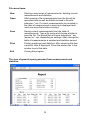
File menu items:
New
Open
Starting a new series of measurements, deleting current
measurements and statistics.
After opening a file measurements from the file will be
recovered and as well as statistics saved in file with
extension *.ser. If current measurements are included in
the table of measurements a warning is displayed and
users can save them before erasing.
Save
Saving current measurements from the table of
measurements. Type a file name and choose a folder to
save the file. The saved files will have extensions *.ser
(series) or *.csv, depending on settings. After savings the
table of measurements is emptied and statistics zeroed.
Print
Printing weighings and statistics. After choosing the item
a printout view is displayed. Press the printer icon in the
window to print the data.
Exit
Closing the program
The view of general report generated from measurements and
statistics:
16
6. MEASUREMENTS
Notice:
In case of lack of communication between the program and a scale check
the configuration of connection in the menu:
„Settings/Options/Communication”.
6.1. Automatic operation
The automatic operation is started by pressing button
„Start” in the menu „Measurements”:
or choosing item
The frequency of readings is set in window „Cycle setup” (see section
4.2). If the cyclical operation is enabled the program fetches data in the
predefined cycles. In other cases measurements are fetched continuously
(with maximum speed for the baud rate). The automatic operation stops
after pressing button
or item „Stop” in the menu “Measurements”.
The automatic operation can be terminated after pressing button
or item „Pauze” in the menu “Measurements”.
6.2. Read
In order to read data from a scale press button
or choose item
„Read stable data” in the menu „Measurements”:
17
You can press button „Print” on the scale.
6.3. Tarring
A scale cooperating with “Boeco” software can be tarred by pressing
button
or choosing item „Tare” in the menu „Measurements”:
The scale will display 0, and all performed measurements will be of net
value.
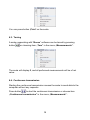
6.4. Continuous transmission
Starting the continuous transmission causes the scale to send data to the
computer without any requests.
to start the continuous transmission or choose item
Press button
„Continuous transmission” in the menu „Measurements”:
18
A window informing about receiving data is displayed.
Press button
to stop continuous transmission or press „Esc”
on the keyboard. Then measurements will be copied to a database.
6.5. Reading non-stable data
If we want to register data without checking if results are stable or not
or choose item „Read unstable data” in menu
press button
„Measurements”:
19
If a scale sends „non-stable” data icon
If the scale sends „stable” data icon
is displayed in the toolbar.
is displayed in the toolbar.
6.6. Calibration report
In order to show all data send by a scale (not only measurements) press
or choose item „Show report” in the menu „Measurements”.
icon
It can be used e.g. for receiving and saving calibration reports.
Calibration report window:
20
Data can be saved to a text file by pressing button „Save as…” and/or
print to a *.pdf file by pressing button „Print report”.
6.7. Chart
Collected measurements can be presented as a chart. Press button
or „Measurements” in the menu and submenu „Show chart” to draw
the chart:
Chart parameters can be changed in window „Chart setup” (see section
4.3). In order to print the chart right-click the chart and choose „Print”
from the pop-up menu.
21
7. LANGUAGE
Users can change the language after choosing „Language” in the menu:
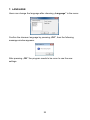
Confirm the choosen language by pressing „OK”, then the following
message window appears:
After pressing „OK” the program needs to be rerun to use the new
settings.
22
Boeckel + Co (GmbH + Co) KG
Roedingsmarkt 33
20459 Hamburg
Germany
Phone: + 49 40 325627-0
Fax: + 49 40 325627-41
E-mail: [email protected]
Internet: www.boeco.com
23